How Modern AI Tools Work
A high-level explanation of how tools like ChatGPT and Claude take prompts, use patterns from training, and generate helpful but imperfect answers.
Overview
Before we dive into neural networks and deep learning, it helps to examine AI through the tools most learners encounter first: ChatGPT, Claude, Copilot, and Gemini.
These tools feel conversational, helpful, and sometimes surprisingly smart. But for a QA professional, the most important question is not just *"What can the tool do?"* It is *"What is the tool actually doing under the hood, and why does it sometimes fail?"*
This lesson provides that high-level mental model. You do not need the full engineering detail yet. You need a clear and practical picture of how a modern AI tool receives a prompt, processes patterns, generates an answer, and still makes mistakes that QA must catch.
Learning Goals
By the end of this lesson, you'll be able to:
- Explain how a modern AI assistant works at a high level without heavy math
- Describe the basic flow from prompt to response
- Understand why tools like ChatGPT and Claude can sound confident even when they are wrong
- Recognize the difference between useful output and reliable output
- See why QA professionals should understand these tools before studying deeper model architecture
Core Concepts
1. Start With the User Experience
From the outside, modern AI tools feel simple:
- A user types a prompt
- The tool reads the prompt
- It generates an answer
- The user asks follow-up questions
That experience feels natural because the interface is conversational. But the simplicity of the interface can hide the complexity of what is happening behind it.
At a high level, these tools are:
- trained on very large amounts of text
- designed to detect patterns in language
- optimized to predict what text should come next
- aligned so their answers are usually more helpful, safer, and more conversational
This is why they often feel intelligent. They are very good at continuing patterns in a way that matches human language.
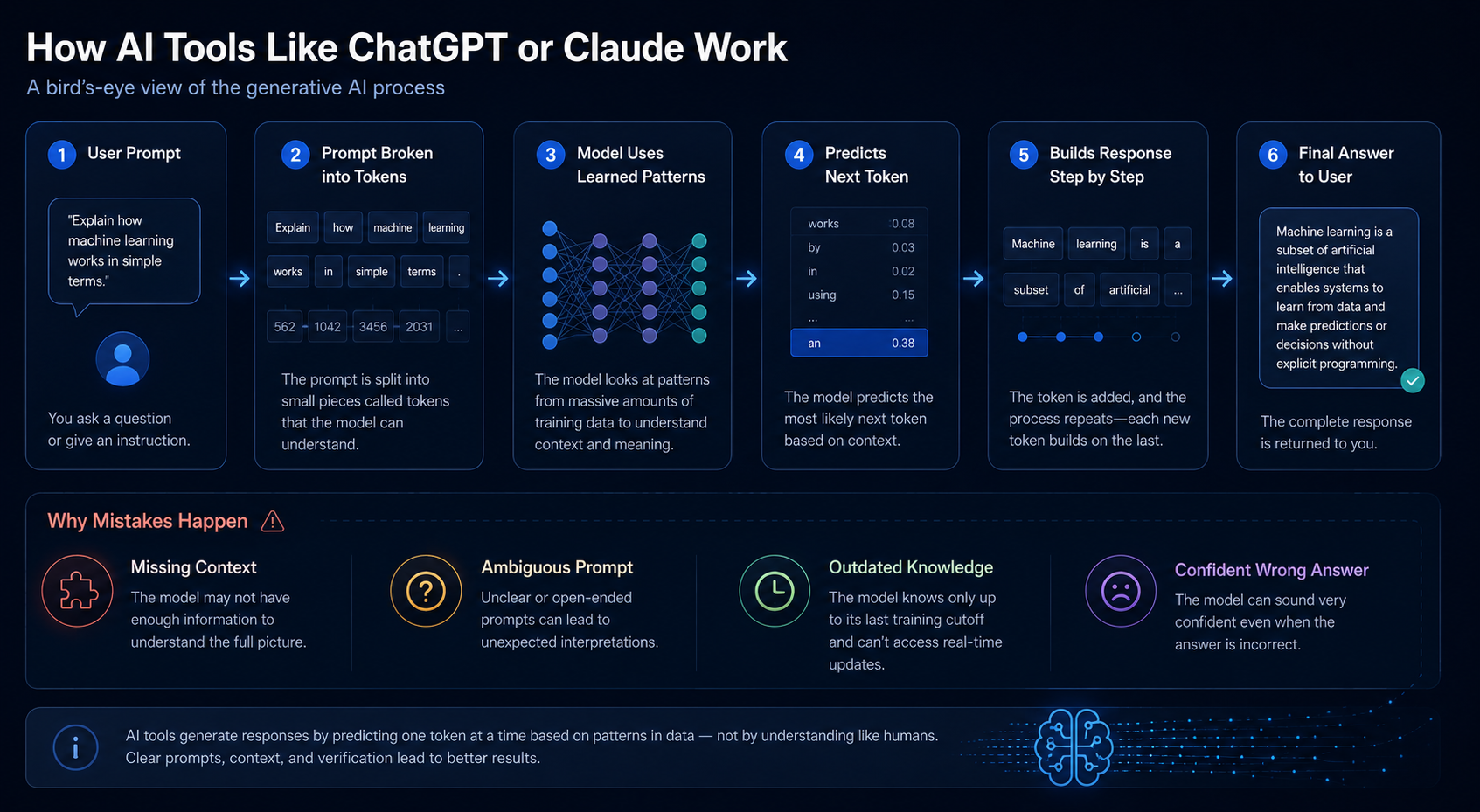
2. The High-Level Flow
Here is the simplest mental model:
- You provide a prompt
- The system breaks that prompt into smaller pieces
- The model compares those patterns with what it learned during training
- It predicts the most likely useful next tokens
- It repeats that process until it builds a full response
- The final answer is shown to the user
This is not exactly how every internal step works, but it is the right high-level picture for a beginner.
3. Why These Tools Feel Smart
They feel smart for several reasons:
- they have seen enormous amounts of language patterns
- they are very good at summarizing, rephrasing, and structuring information
- they can keep context from the current conversation
- they produce answers in fluent human-like wording
For QA learners, this is important: fluency is not the same as correctness.
A model can:
- sound clear
- follow a professional tone
- produce nicely formatted steps
- still contain factual mistakes
That is why modern AI tools can be genuinely useful and still require careful validation.
4. Why These Tools Make Mistakes
Modern AI tools do not "know" information the same way a person does. They generate responses based on patterns and probabilities. That leads to several familiar failure modes:
| Failure Mode | What It Looks Like | Why QA Should Care |
|---|---|---|
| Hallucination | The tool invents a fact, API, test step, or reference | Can mislead testers and developers |
| Prompt misunderstanding | The model answers a different question than the one asked | Causes false confidence in incorrect output |
| Missing business context | The answer is generic and ignores product-specific rules | Dangerous in real QA workflows |
| Inconsistency | Similar prompts produce different quality levels | Hard to trust without evaluation |
| Overconfidence | The wording sounds certain even when the answer is weak | Easy for teams to accept bad output too quickly |
5. Where Training and Alignment Fit In
At this level, you only need a simple mental model:
- Training gives the model its broad pattern recognition ability
- Fine-tuning and alignment help make responses more useful, safe, and human-friendly
- System instructions and product guardrails shape how the tool behaves in a real app
This is why the same underlying model can behave differently depending on the product around it.
For example:
- ChatGPT may emphasize polished conversational output
- Claude may emphasize careful reasoning and safety tone
- Copilot may emphasize coding workflows
The model matters, but the surrounding product experience matters too.
6. Why QA Professionals Should Care Before Studying Neural Networks
If you are a QA professional, this lesson matters because it connects familiar tool behavior to later technical concepts.
When you see ChatGPT:
- ignore a constraint
- make up a missing detail
- respond differently to a slightly different prompt
- produce helpful structure but weak facts
you are seeing symptoms of how these systems are built.
Later lessons about:
- neural networks
- deep learning
- transformers
- prompt engineering
- hallucinations
- evaluation
will make much more sense because you already have the practical picture.
QA/SDET Relevance
Manual QA Perspective
Manual QA professionals should treat AI tools the same way they treat any other intelligent-looking system: useful, but never above verification.
Good exploratory questions include:
- Does the tool follow the prompt accurately?
- Does it stay consistent when I rephrase the request?
- Does it make unsupported assumptions?
- Does it handle incomplete or ambiguous input safely?
- Does it expose risky, biased, or misleading answers?
Example:
If you ask an AI assistant to summarize a defect, manual QA should compare:
- the original bug description
- the generated summary
- any missing severity, environment, or reproduction details
QA Automation / SDET Perspective
Automation engineers and SDETs should think of modern AI tools as systems that need behavioral validation, not only exact-match assertions.
Useful automation checks include:
- verifying required structure in the response
- checking whether forbidden content appears
- validating JSON or schema output
- comparing model output quality on a saved regression set
- tracking output drift after prompt or model changes
Example:
If an AI tool generates test cases from requirements, your automation can verify:
- required fields exist
- output format stays parseable
- prohibited phrases do not appear
- core acceptance criteria are represented
Practical Work
Objective: Use a QA mindset to analyze a modern AI tool before studying the deeper model architecture behind it.
Exercise Part 1: Prompt Observation
Use ChatGPT, Claude, or another general AI assistant and try these three prompts:
- "Summarize how login testing should work for a banking app."
- "Create 10 negative test cases for a password reset flow."
- "Explain why an AI assistant might give a wrong answer even if it sounds confident."
For each answer, note:
- what the tool did well
- what it assumed without being told
- what a QA professional would still need to validate manually
Exercise Part 2: QA Review Table
Create a small review table like this:
| Prompt | Useful Output | Risk or Weakness | Human Validation Needed |
|---|---|---|---|
| Banking login summary | Good structure and coverage ideas | May ignore real product rules | Check business logic and compliance needs |
| Password reset test cases | Fast starting point | Could miss domain-specific edge cases | Review risk coverage and security cases |
| Why AI gives wrong answers | Clear explanation | Could oversimplify technical reasons | Cross-check with trusted references |
Reflection Questions
- Which parts of the AI output would you trust as a first draft?
- Which parts would you never accept without human review?
- What failures came from missing prompt detail, and what failures likely came from the model itself?
- How does this exercise change the way you think about AI-generated testing output?
Key Takeaways
- Modern AI tools feel simple on the surface, but their output comes from large-scale pattern prediction.
- A useful answer is not automatically a correct or reliable answer.
- Prompt wording, missing context, and model limitations all affect quality.
- QA professionals should study these tools through behavior, consistency, risk, and validation.
- This high-level understanding makes neural networks and deep learning easier to learn next.
Next Step
Next, we will move into Neural Networks Made Easy and connect this high-level tool behavior to the actual computational building blocks that make modern AI possible.