Self-Healing Test Automation with AI
Use AI to detect broken selectors and auto-repair failing tests without manual intervention.
Overview
Every automation engineer faces the same problem: Selectors break, tests fail, and you spend hours fixing them. When the DOM changes slightly—a class name, a hierarchy shift, an ID update—carefully crafted XPaths and CSS selectors become fragile.
Self-healing test automation uses AI to automatically detect when a selector fails and regenerate a working one without human intervention. Tools like Passmark (Playwright + AI), quorvex_ai, and agent-qa are making this a reality. Instead of manually updating 50 broken locators, the test suite repairs itself.
This lesson teaches you how self-healing works, when to use it, when to avoid it, and how to integrate AI repair strategies into your automation framework.
A Practical Note for QA Learners
This lesson follows naturally from visual testing: once you can use AI to inspect what users see, the next question is whether AI can also help maintain what your tests click.
The answer is "yes, with guardrails."
Learning Goals
- Understand why selectors break and the cost of maintenance
- Explain self-healing mechanisms: detection, regeneration, verification
- Evaluate self-healing trade-offs: confidence, flakiness vs. manual repairs
- Implement self-healing patterns in Playwright and Selenium workflows
- Build a self-healing framework that logs repairs for review
Core Concepts
The Selector Fragility Problem
1Timeline of a brittle selector:23Day 1: Write test4selector = "button.checkout-btn" ✓ Works56Day 30: Frontend dev refactors CSS7selector = "button.checkout-btn" ✗ Class removed, replaced with data-test-id89Day 31: QA gets Slack alert: "Tests failing"10Automation engineer: Manual hunt for new selector11Time lost: 30 min per broken selector × 50 selectors = 25 hours/sprint1213Opportunity cost: Could have written new tests insteadManual vs. Self-Healing Maintenance
| Factor | Manual Repair | Self-Healing |
|---|---|---|
| Time to fix | 30 min (debug + update) | 1 sec (auto-repair) |
| Human effort | High (engineer involved) | Low (logged, reviewed async) |
| Confidence | Very high (engineer verifies) | Medium (AI may misidentify) |
| Maintenance debt | Grows over time | Pays down continuously |
| For 50 broken selectors | 25 hours | 1 minute + review |
| False positives | Rare | Possible (AI fixes wrong element) |
Self-Healing Workflow
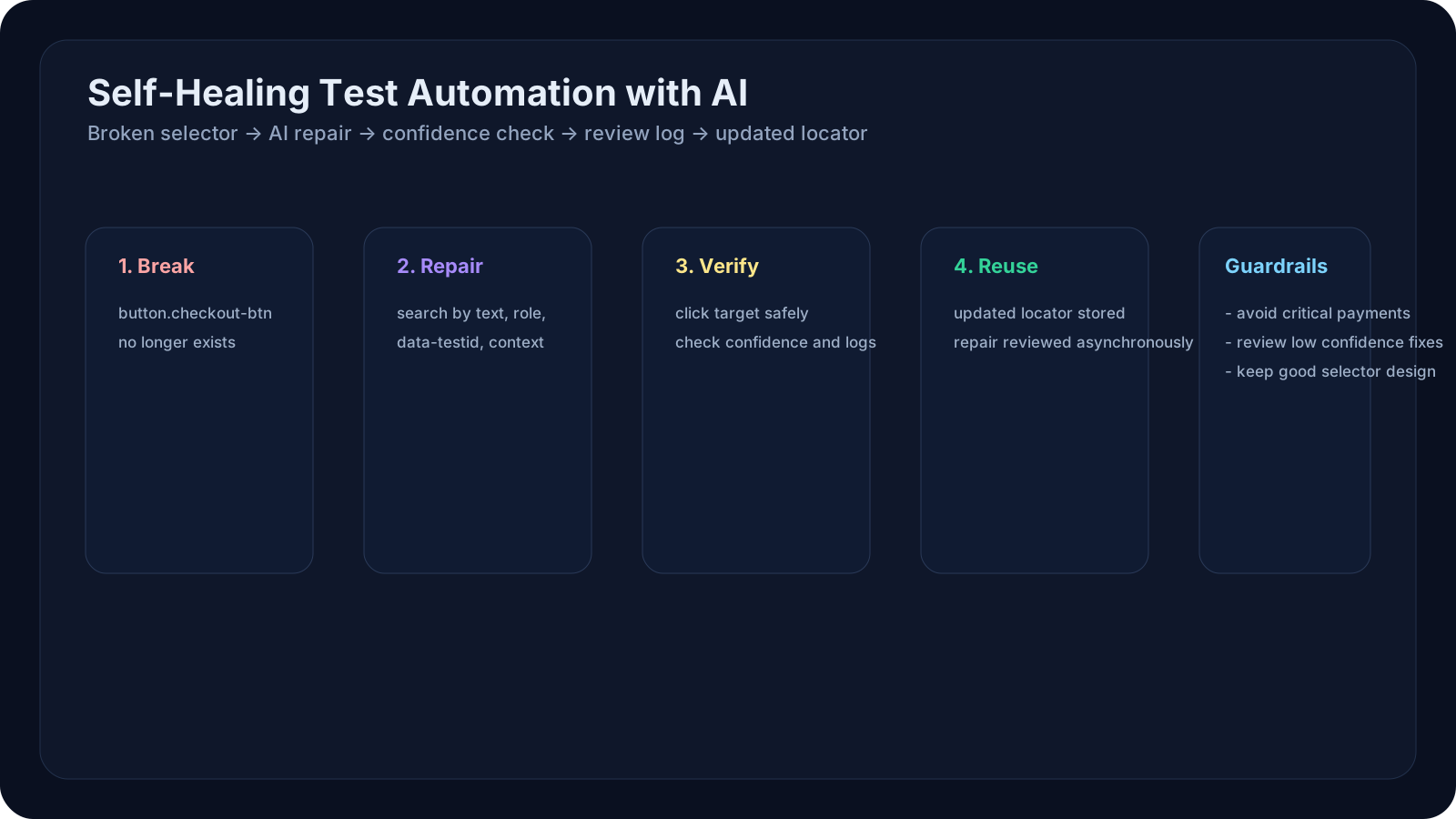
1Test Execution:21. Try original selector32. Selector fails (element not found)43. AI kicks in:5 - Analyze current DOM6 - Find semantically similar element7 - Generate new selector8 - Verify new selector works (single click test)94. Update stored selector105. Log repair + notify QA lead116. Continue test execution127. Next run: Uses repaired selector1314Result: Test passed (repaired), developer notified of DOM changeStrategies for Self-Healing
Strategy 1: Multi-Strategy Selector Matching
1# Original selector breaks2original = "button.btn-primary:nth-child(2)"34# AI tries these in order:5strategies = [6 "button:contains('Add to Cart')", # Text-based7 "button[data-testid='add-btn']", # Test ID8 "button[aria-label='Add to Cart']", # Accessibility9 "//button[.//span[text()='Add']]", # XPath with text10 "button.checkout-action", # Updated class11]1213# Pick first match; log which workedStrategy 2: Element Context
1# Original: Find checkout button near total price23# If broken, use context:4def find_button_near_price(page, target_text):5 # Find price element6 price_elem = page.locator("text=Total:")7 8 # Find nearby button (parent or sibling)9 parent = price_elem.evaluate("el => el.closest('form')")10 button = parent.locator(f"button:has-text('{target_text}')")11 return buttonStrategy 3: Visual + DOM Hybrid
1# 1. Screenshot current page2screenshot = page.screenshot()34# 2. Ask Claude: "Where is the checkout button?"5# 3. Claude returns coordinates or region67# 4. Use AI-identified region to narrow selector search8# 5. Scan that region for clickable elements910# Reduces false positives by bounding searchHow Self-Healing Works in Practice
Example 1: Passmark (Playwright + AI)
Passmark is a Playwright library that auto-heals selectors using intelligent caching and multi-model verification.
1from passmark import PlaywrightTest23class CheckoutTest(PlaywrightTest):4 5 async def test_checkout_flow(self):6 page = self.page7 8 # Regular Playwright code9 await page.goto("https://shop.example.com/checkout")10 11 # Passmark wraps the locator12 # If selector fails, it auto-repairs + verifies13 checkout_btn = self.locator("button.checkout-btn", healing=True)14 15 # If .checkout-btn no longer exists:16 # 1. Passmark analyzes DOM17 # 2. Finds button with similar role/text18 # 3. Auto-generates new selector19 # 4. Verifies new selector works20 # 5. Uses new selector going forward21 await checkout_btn.click()22 23 # Passmark logs the repair:24 # {25 # "original": "button.checkout-btn",26 # "repaired": "button[data-testid='checkout']",27 # "confidence": 0.95,28 # "method": "text_match"29 # }Example 2: Manual Self-Healing in Playwright
1import anthropic2from playwright.async_api import Page34class SelfHealingLocator:5 def __init__(self, page: Page, original_selector: str):6 self.page = page7 self.original_selector = original_selector8 self.repair_log = []9 10 async def get_element(self):11 # Try original first12 try:13 elements = self.page.locator(self.original_selector)14 if await elements.count() > 0:15 return elements16 except:17 pass18 19 # Original failed; time to heal20 print(f"Selector broken: {self.original_selector}")21 new_selector = await self._repair_selector()22 23 if new_selector:24 self.repair_log.append({25 "original": self.original_selector,26 "repaired": new_selector,27 "timestamp": datetime.now()28 })29 self.original_selector = new_selector # Update for next run30 return self.page.locator(new_selector)31 else:32 raise Exception(f"Could not repair selector")33 34 async def _repair_selector(self):35 """Use AI to generate new selector."""36 37 # Get current page HTML (limited to relevant section)38 page_html = await self.page.content()39 40 client = anthropic.Anthropic()41 response = client.messages.create(42 model="claude-opus-4-7",43 max_tokens=500,44 messages=[45 {46 "role": "user",47 "content": f"""Given this HTML:48{page_html[:2000]}4950The original Playwright selector '{self.original_selector}' no longer works (element not found).5152Generate 3 alternative CSS or XPath selectors that would find the same element:53- Consider text content (button text, labels)54- Consider aria attributes55- Consider data-testid attributes56- Consider element hierarchy5758Return ONLY the 3 selectors, one per line, in order of reliability:59"""60 }61 ]62 )63 64 candidates = response.content[0].text.strip().split('\n')65 66 # Verify each candidate67 for selector in candidates:68 try:69 locator = self.page.locator(selector.strip())70 count = await locator.count()71 if count == 1: # Found exactly one match72 return selector.strip()73 except:74 continue75 76 return None # Could not repairQA/SDET Relevance
Manual QA Perspective
Self-healing doesn't directly apply to manual testing, but knowing self-healing exists means automation engineers can focus on new scenarios instead of maintenance. Manual QA benefits indirectly: fewer test breaks → more coverage.
Automation Engineer Perspective
Before: Test breaks → Wait 1–2 days for fix After: Test auto-repairs → Immediately uses new selector; logs for review
Real-world improvement:
1Old workflow: 50 broken tests × 30 min = 25 hours/sprint2New workflow: 50 tests auto-repair in 50 sec; engineer reviews logs = 1 hour/sprint3Savings: 24 hours/sprint = ~6 hours/weekSDET Perspective
Build a self-healing framework:
1class AutomationFramework:2 def __init__(self):3 self.repair_db = {} # { original_selector: new_selector }4 self.ai_client = anthropic.Anthropic()5 6 def locator(self, selector, page, description=""):7 """Wraps Playwright locator with self-healing."""8 return SelfHealingLocator(page, selector, self.ai_client, description)9 10 def get_repair_report(self):11 """Generate report of auto-repairs for review."""12 return {13 "total_repairs": len(self.repair_db),14 "repairs": self.repair_db,15 "review_url": f"{self.dashboard_url}/repairs"16 }Examples and Use Cases
Example 1: Frontend Refactor → Auto-Repair
Scenario: Frontend team refactors button classes. 30 test selectors break.
Manual (old way):
- QA gets alert Friday 5 PM
- Monday morning: 2 hours debugging + fixing selectors
- Monday afternoon: Re-run tests
Self-healing (new way):
- Tests run Friday 5 PM
- All 30 broken selectors auto-repair
- Repair log shows: "30 selectors regenerated from
btn-primary→btn-action" - Monday morning: QA engineer reviews log (5 min), approves repairs (1 min)
- Tests passing before standup
Example 2: Dynamic Content → Context-Based Repair
Scenario: E-commerce page dynamically adds products. Selector like div.product:nth-child(5) breaks when product order changes.
Self-healing logic:
1# Broken selector: "div.product:nth-child(5)"2# Product at position 5 no longer exists34# Self-healing uses product name + context:5new_selector = "div.product:has(h2:contains('Samsung TV 55in'))"67# This selector is:8# 1. More stable (based on content, not position)9# 2. More readable (QA can understand what it's testing)10# 3. Less fragile (works even if product order changes)Example 3: Flaky Tests Due to Race Conditions → Adaptive Repair
Scenario: Selector works, but sometimes element is hidden/disabled. Test is flaky.
Self-healing detects:
1# Selector works, but:2# - Element was hidden (display: none)3# - Element was disabled4# - Element was outside viewport56# Self-healing adapts:7# Original: "button.submit"8# Repaired: "button.submit:visible:enabled"910# Reduces flakiness by making expectations explicitHands-On Exercise
Exercise 1: Analyze Selector Brittleness
Your task: Identify selectors that would break easily.
Steps:
- Go to any website (Amazon, Gmail, your app)
- Open Developer Tools → Inspect an interactive element (button, form field)
- Write 3 selectors for that element:
1 CSS: button.btn-primary:nth-child(2)2 XPath: //button[contains(@class, 'primary')]3 Text: button:has-text('Add to Cart')- For each, ask: "If the HTML changed, would this selector still work?"
- Selector 1: Very fragile (nth-child breaks on reorder)
- Selector 2: Moderate (class names can change)
- Selector 3: More resilient (text is unlikely to change)
- Write down: Which selector is most resilient? Why?
Exercise 2: Simulate Self-Healing
Your task: Manually practice what self-healing does automatically.
Steps:
- Write a Playwright test with a selector:
1 await page.click("button.checkout")- Break the selector:
- Go to the website's HTML
- Change
.checkoutto.complete-order(simulate refactor)
- Run test → observe failure
- Practice "healing":
- Look at updated HTML
- Find new selector that works
- Update test code
- Re-run test → should pass
- Time the fix: Was it > 10 minutes? Self-healing would have done it in 1 second
Exercise 3: Design a Self-Healing Strategy
Your task: Plan how self-healing would improve your team's automation.
Answer these:
- How many tests does your team have? ___
- How often do selectors break? (weekly, monthly) ___
- How long to fix each? ___ minutes
- Total maintenance time/sprint: ___ hours
- If 80% of repairs were automatic, new time/sprint: ___ hours
- Time savings/month: ___ hours
- What would your team do with that time? (Write more tests? Exploratory testing?)
Self-Healing Limitations & When NOT to Use
⚠️ When Self-Healing Is NOT Appropriate
1DON'T use self-healing for:231. Critical financial tests (payment, transfers)4 - Too risky if AI picks wrong element5 - Manual verification required672. Security-sensitive tests (login, password reset)8 - Repair might click phishing link instead of real button9 - High stakes for error10113. Tests with no unique identifiers12 - e.g., "Click any red button"13 - Too ambiguous for AI to repair safely14154. Frequently changing UI16 - Every sprint, new CSS = constant repairs17 - Signals test design is fragile, not selector issue✓ When Self-Healing Works Well
1DO use self-healing for:231. Utility features (settings, navigation, back buttons)4 - Low risk if selector is slightly off5 - High volume of tests affected by refactors672. Data-driven tests (product listings, search results)8 - Selectors often break due to pagination, filtering9 - Self-healing adapts to new layouts10113. High-maintenance suites (100+ tests, frequent updates)12 - ROI is high (saves 20+ hours/sprint)13 - AI repair gives more attention to writing new tests14154. Teams with limited QA engineering bandwidth16 - Reduce context-switching from maintenance to new featuresKey Takeaways
- Self-healing shifts test maintenance from reactive (breaking) to proactive (adapting). Tests fix themselves instead of waiting for engineers.
- Not a replacement for good test design. Use data attributes (
data-testid), semantic selectors, and accessibility locators as primary strategies; self-healing as backup.
- Confidence and auditing matter. Log every repair. Review with your team. Some repairs are wrong—catch them before production.
- Trade-off: Automation vs. Control. You gain speed but lose visibility into DOM changes. Use repair logs to detect real issues (bad refactors, broken APIs).
- Self-healing works best for moderate-sized suites (50–500 tests). Very small suites: Not enough ROI. Very large suites: Repair logs become unmanageable.
- Multi-model verification improves confidence. Cross-check repairs with Claude + GPT-5 before applying; reduces false positives.
Next Steps
- Evaluate self-healing tools (Passmark, quorvex_ai, agent-qa) for your test framework
- Start small: Enable self-healing on 10–20 non-critical tests, review logs for 1 sprint
- Monitor repair accuracy: Track how many repairs are correct vs. incorrect
- In Level 7, combine self-healing with AI-generated tests: generate new tests + self-heal existing ones = full automation lifecycle