AI Tools Every QA Should Know
Evaluate ChatGPT, Claude, Gemini, GitHub Copilot, Cursor, and Perplexity by workflow fit and QA use cases.
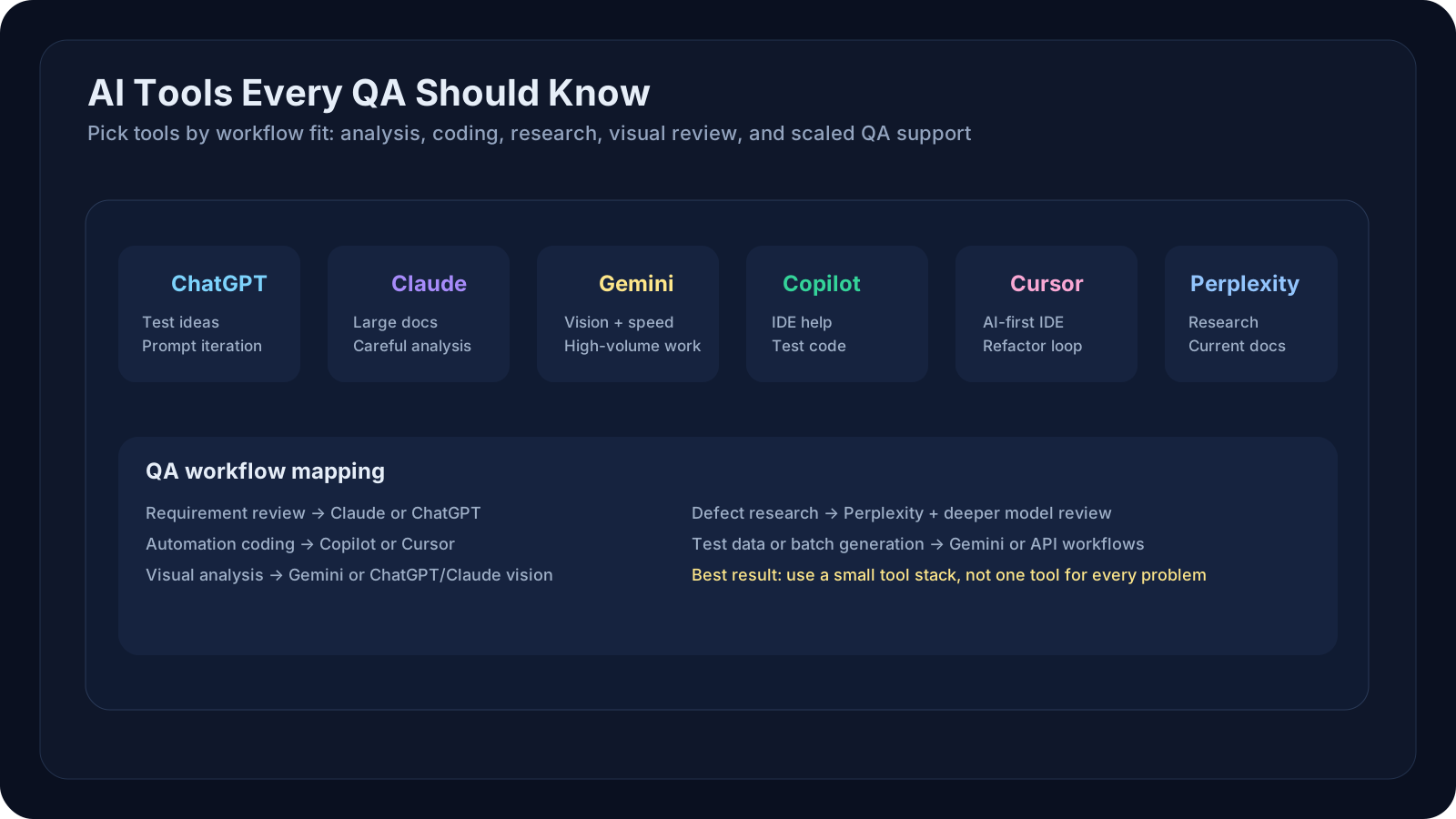
Overview
Level 5 focused on how to write better prompts. Level 6 shifts the question from "How do I prompt well?" to "Which tool should I use for this QA job?"
The AI tools landscape is crowded, and QA teams can easily get lost if every tool starts to sound interchangeable. This lesson helps you compare the major players—ChatGPT, Claude, Gemini, GitHub Copilot, Cursor, and Perplexity—by workflow fit, not hype. The goal is to help you build a practical multi-tool strategy before the course moves into even more applied AI-for-QA patterns in Level 7.
A Practical Note for QA Learners
Do not try to pick a single "winner" for all work.
Instead, ask:
- which tool is best for requirement and test analysis?
- which tool is best inside the IDE?
- which tool is best for research and current information?
- which tool is best for long-context reasoning?
- which tool is safe and cost-effective for repeated team workflows?
Also note: model names, limits, and pricing change frequently. Treat the comparison in this lesson as a workflow guide, and verify exact commercial details on vendor pages before making team purchasing decisions.
Learning Goals
- Compare six major AI tools by workflow fit, integration style, speed, and output quality
- Match each tool to QA workflows: test design, automation, code review, defect analysis
- Assess trade-offs for both solo QA engineers and small teams
- Identify integration points with CI/CD, IDEs, and QA platforms
- Build a tool selection framework for your QA practice
Core Concepts
Understanding Tool Selection Criteria
When choosing an AI tool for QA, evaluate these dimensions:
| Criteria | Why It Matters | Example |
|---|---|---|
| API vs. Chat UI | APIs scale for automation; chat UI is faster for ad-hoc tasks | GitHub Copilot (IDE integration) vs. ChatGPT (web UI) |
| Context Window | Larger windows let you paste full test specs, error logs, code bases | Claude Opus 4.7: 200k tokens (can fit ~150 pages) |
| Speed | Faster iteration on prompts; matters in fast-paced defect triage | GPT-5 mini: faster than GPT-5 Turbo for simple requests |
| Cost Model | Affects team adoption and scale; matters for high-volume usage | Subscription seat, API billing, or a mix of both |
| Reasoning & Accuracy | Affects quality of generated tests, defect summaries | Claude Opus 4.7: known for careful analysis; GPT-5: broader knowledge |
| Multimodal | Can process screenshots, PDFs, video frames for UI testing | Gemini, Claude, GPT-5 support images; Perplexity has web search |
| IDE/CI-CD Integration | Reduces friction for developers and automation engineers | GitHub Copilot (native in VS Code); Cursor (editor built on VSCode) |
The Six Tools: Quick Reference
1┌──────────────┬──────────────┬────────────────┬─────────────┬────────────┐2│ Tool │ Provider │ Primary Use │ Best For │ QA Angle │3├──────────────┼──────────────┼────────────────┼─────────────┼────────────┤4│ ChatGPT │ OpenAI │ General chat │ Broad │ Test ideas │5│ Claude │ Anthropic │ Long context │ Deep review │ Large docs │6│ Gemini │ Google │ Fast + multimodal │ Volume │ Vision + scale │7│ GitHub │ GitHub │ IDE assistant │ Coding │ Test code │8│ Copilot │ / OpenAI │ + chat │ workflows │ in editor │9│ Cursor │ Anysphere │ AI-first IDE │ Heavy │ Refactor + dev loop │10│ Perplexity │ Perplexity │ Search-grounded chat | Research | Current references │11└──────────────┴──────────────┴────────────────┴─────────────┴────────────┘Detailed Tool Profiles
1. ChatGPT (OpenAI)
Strengths:
- Broad knowledge, strong reasoning for complex QA scenarios
- Fast for iterative prompting ("Do this, now modify that")
- Fine-tuned for instructions; reliably follows prompt structure
- Web-based, no setup
- Free tier: 50 messages/3 hours; Pro: $20/month
For QA:
- Test case generation with role-based prompts
- Defect triage and root-cause summaries
- Quick brainstorming on test strategy
- API available for automation pipelines
When to choose: You want a well-rounded tool; fast, interactive prompting; broad QA knowledge
2. Claude (Anthropic)
Strengths:
- 200k token context window (vs. ChatGPT's 128k): can ingest entire test specifications, APIs, requirements
- Reputation for careful, step-by-step reasoning
- Excels at nuanced defect analysis and root-cause reasoning
- Good at handling ambiguous or contradictory requirements
- API and web interface
For QA:
- Paste entire API documentation → generate comprehensive test matrices
- Complex defect analysis: describe symptoms, get structured diagnosis
- Long test specifications → generate aligned test cases
- Thoughtful prompts on testing strategy
When to choose: You need to analyze large documents, build comprehensive test suites, or need careful reasoning on tricky defect scenarios
3. Gemini (Google)
Strengths:
- Fast, cheap models (Gemini 2.5 Flash-Lite: $0.10 per M input tokens)
- Built-in Google Search grounding (fact-check, find latest docs)
- Multimodal (images, video, PDFs)
- Free tier with generous limits
- 1M token context window on some models
For QA:
- Rapid-fire test case generation at low cost (good for high-volume test suites)
- Process PDFs of requirements, screenshots of UI, API response dumps
- Ground answers in real-time documentation (e.g., "Based on the latest Selenium docs…")
- Batch processing for large-scale defect categorization
When to choose: Budget-conscious; need fast iteration; want multimodal support; processing large volumes of test data
4. GitHub Copilot
Strengths:
- Native IDE integration (VS Code, Visual Studio, JetBrains)
- Inline code suggestions while writing tests
- Fast—optimized for millisecond response times
- Seamless code review comments
- Chat mode for longer conversations
For QA:
- Generate Selenium, Playwright, Cypress scaffolds as you type
- API test generators (Postman, REST-assured templates)
- Quick refactoring suggestions for test code
- Unit test generation for test utilities
- Code review for test readability, coverage
When to choose: You're writing test code in an IDE and want in-context suggestions; part of GitHub enterprise workflow
5. Cursor
Strengths:
- AI-first IDE built on VSCode
- Deeply integrated AI: select code, ask questions, get refactoring
- Tab to autocomplete, chat to iterate
- Feels more "copilot-like" than plugins
- Good for heavy coding workflows
For QA:
- Automation engineer dream: write Playwright tests while AI suggests next steps
- Full test framework refactoring in one chat
- Generate test utilities, fixtures, page objects
- Build CI/CD pipeline configurations
When to choose: You spend >50% of time writing automation code; want a tight IDE + AI loop
6. Perplexity
Strengths:
- Built-in web search (cites sources)
- Great for research: "What's the difference between unit and integration tests?"
- Fast iteration
- Can find latest best practices, tool releases, benchmarks
- Free and premium tiers
For QA:
- Research QA best practices, latest tool capabilities
- Find examples of how to test new frameworks
- Verify test strategies against industry standards
- Understand competitor QA approaches
When to choose: You're researching QA practices, need web citations, or want to stay current on tooling
QA/SDET Relevance
Manual QA Perspective
Scenario: You're triaging defects and need to write test case recommendations for regression.
- Best tool: Claude (analyze complex defect scenarios) + ChatGPT (interactive refinement)
- Workflow: Describe defect in Claude → receive structured root cause analysis → share structured template with team in ChatGPT
QA Automation Engineer Perspective
Scenario: You're building Playwright tests for a new checkout flow and need test case scaffolding + API test coverage.
- Best tool: GitHub Copilot (IDE integration) + Cursor (AI-first coding) + Claude (large API spec upload)
- Workflow: Open Cursor, paste API spec (200k tokens), get test matrix → tab-autocomplete Playwright → generate API tests
SDET Perspective
Scenario: You're building a test framework, CI/CD integration, and need both architecture suggestions and rapid code iteration.
- Best tool: Cursor (IDE loop) + Claude (architecture decisions on large codebase) + Gemini API (bulk test data generation)
- Workflow: Use Cursor for iterative test framework development → upload full codebase to Claude for refactoring suggestions → use Gemini API in CI to generate synthetic test data
Cost-Benefit Analysis by Role
| Role | Primary Tools | Budget/Month | Why |
|---|---|---|---|
| Manual QA | ChatGPT + Claude | Varies by seat plan | Iteration + depth |
| Automation QA | GitHub Copilot + ChatGPT | Varies by seat plan | IDE + prompting |
| SDET | Cursor + Claude or ChatGPT API | Varies by team workflow | Coding speed + depth |
| Small QA Team (5–10) | Mixed seats + API access | Depends on usage model | Blend of editor support and scaled automation |
Examples and Use Cases
1. Test Case Generation for New Feature
Input: Feature spec (200 lines, 5 acceptance criteria)
| Tool | Time | Quality | Cost | Best For |
|---|---|---|---|---|
| ChatGPT | 2 min | 8/10 | $0.10 | Quick, reliable |
| Claude | 3 min | 9.5/10 | $0.15 | Comprehensive |
| Gemini | 1 min | 7/10 | $0.02 | Speed + budget |
| Copilot | 5 min | 7/10 (needs refinement) | $0 | Free IDE integration |
2. Defect Root-Cause Analysis
Input: Test failed with timeout in checkout flow
| Tool | Insight | Cost | Speed |
|---|---|---|---|
| ChatGPT | Generic causes (network, DB load, code) | $0.10 | 30s |
| Claude | Specific hypotheses from architecture context | $0.20 | 60s |
| Perplexity | Cross-checks against known issues | $0.15 | 45s |
3. Generating Playwright Test Boilerplate
Input: "Create a Playwright test for login flow"
| Tool | Output | Integration | Cost |
|---|---|---|---|
| ChatGPT | Full script | Copy-paste | Free–$0.01 |
| Copilot | Inline suggestions | Live in VS Code | Free–$0.83/mo |
| Cursor | Full scaffold + refinement loop | IDE native | Free–$20/mo |
4. API Documentation → Test Matrix
Input: OpenAPI spec (500 endpoints, 2MB YAML)
| Tool | Capability | Cost | Why |
|---|---|---|---|
| ChatGPT | Limited (token window) | $0.10 | Can't fit full spec |
| Claude | Full spec ingestion + analysis | $0.30 | 200k context window |
| Gemini | Chunked processing | $0.05 | Can batch via API |
| GitHub Copilot | Not suitable | – | Chat UI too limited |
5. CI/CD Test Data Generation at Scale
Input: 10K synthetic user profiles needed for performance testing
| Tool | API Support | Batch Processing | Cost for 10K |
|---|---|---|---|
| ChatGPT | Yes | ~100 calls → $1.00 | Best API quality |
| Claude | Yes | ~100 calls → $3.00 | Most reliable |
| Gemini | Yes | Batch API → $0.30 | Cheapest at scale |
| GitHub Copilot | No | – | Not designed for this |
Winner for scale: Gemini API (cheapest + Batch API support for 50% discount)
Hands-On Exercise
Exercise 1: Compare Tool Outputs on a Real QA Task
Your task: Generate test cases for a "password reset" feature.
Feature Requirements:
- User enters email → receives reset link
- Link valid for 24 hours
- Multiple reset requests invalidate prior links
- Rate limit: 5 requests/hour
Steps:
- Go to ChatGPT, Claude, and Gemini (all free tiers available)
- Paste the feature requirements into each
- Ask: "Generate comprehensive test cases covering happy path, error scenarios, and edge cases. Format as a table with: Test ID, Scenario, Steps, Expected Result."
- Compare outputs:
- Count total test cases
- Look for edge cases (timezone, link expiration edge, rate limit boundary)
- Check clarity of steps
- Which tool found the most security issues?
- Write down:
- Which tool's output was most useful for your QA process?
- How would you refine the weakest output?
- If you had to use two tools, which pair would save you the most time?
Exercise 2: Cost-Benefit Calculation for Your Team
Scenario: Your QA team needs an AI tool for test generation and defect analysis.
Calculate for each tool:
| Tool | Monthly Cost | Est. Prompts/Person | Cost/Query | Best Use |
|---|---|---|---|---|
| ChatGPT Pro | $20 × team size | 200 | $0.10 | Test brainstorming |
| Claude Pro | $20 × team size | 200 | $0.15 | Complex analysis |
| GitHub Copilot | $10 × team size | 500 | $0.02 | Automation coding |
| Gemini Free | $0 | 500 | $0 | Budget option |
Questions:
- What's the cheapest option for your team?
- What's the most capable for your primary use case?
- Would a hybrid approach (e.g., Gemini for bulk generation + Claude for complex analysis) be better?
- If the team grows to 10 people, which tool's cost curve is worst?
Exercise 3: Build Your Multi-Tool Strategy
Based on your QA workflow, complete this table:
| QA Task | Best Tool | Why This Tool | Estimated Monthly Cost |
|---|---|---|---|
| Generate test cases | ___ | ||
| Defect root cause | ___ | ||
| Code review (automation) | ___ | ||
| Research best practices | ___ | ||
| Write automation tests | ___ | ||
| Total |
Key Takeaways
- No single tool wins on every dimension. ChatGPT is balanced; Claude is deep; Gemini is fast and cheap; Copilot integrates into your IDE; Cursor is for coding-heavy teams; Perplexity is for research.
- Context window size matters for documentation work. Claude's 200k tokens let you paste full specs in one go; ChatGPT's 128k is adequate for most tasks; Gemini's cheap per-token pricing makes size less critical.
- IDE integration accelerates automation engineers. GitHub Copilot and Cursor reduce context-switching; chat UIs like ChatGPT are better for strategic, non-coding QA work.
- Multimodal capabilities unlock UI and screenshot analysis. Gemini, Claude, and GPT-5 can process images; important for visual regression testing and screenshot-based bug reporting.
- Speed and cost trade off. Gemini is fastest and cheapest; Claude is thoughtful and deep; ChatGPT balances both.
- Match tool to workflow, not the other way around. Manual QA teams benefit from ChatGPT/Claude chat; automation teams benefit from IDE plugins; SDETs benefit from API access and batch processing.
- Revisit this comparison regularly. The AI landscape changes fast; model quality, quotas, and pricing can shift within a quarter.
Next Steps
- Pick one tool and go deep. Spend a week using it for your actual QA work before adding another.
- Track your costs. Log queries and costs to refine your tool budget and ROI calculation.
- Evaluate tool updates. Subscribe to release notes from OpenAI, Anthropic, Google, and GitHub to stay current.
- In Level 7, we dive into AI-powered QA workflows: how to use these tools systematically in test design, automation, and defect analysis for maximum impact.