Natural Language QA: Testing in English
Write tests in plain English; let AI convert them to Playwright, Selenium, or API calls.
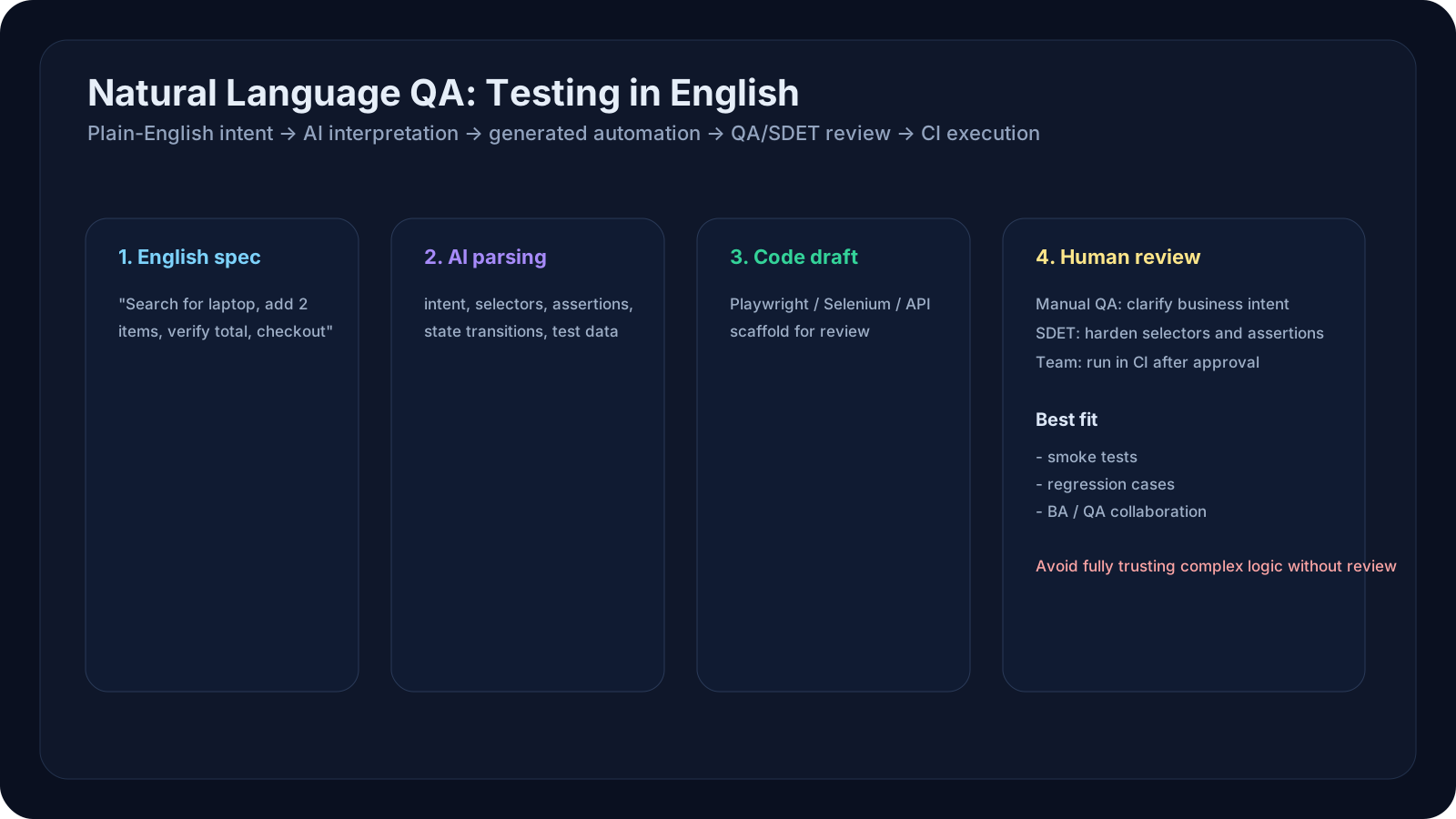
Overview
Test automation has a gatekeeping problem. Only engineers who know Playwright, Selenium, or Python can write tests. Business analysts, non-technical QA, and product owners are locked out.
Natural Language QA removes that barrier. Write tests in plain English—literally describe what you want to test—and AI converts it to automation code:
1English:2"Click the 'Add to Cart' button, enter quantity 5, then verify the price is $150"34AI converts to:5await page.click("button:has-text('Add to Cart')")6await page.fill("input[type='number']", "5")7await expect(page.locator(".total-price")).toContainText("$150")This lesson teaches you how to:
- Write tests in plain English (Gherkin-style or natural prose)
- Use AI tools to convert English → automation code
- Integrate natural language tests into your CI/CD
- Combine with SDETs for edge cases and complex workflows
- Scale testing to non-technical team members
A Practical Note for QA Learners
This is the most "team-bridging" lesson in Level 6.
After learning prompt patterns, tool choice, visual AI, self-healing, and test-data generation, we now ask:
- how do more people participate in QA?
- how can manual QA, BAs, and product people contribute test intent?
- where should SDETs still take over?
Learning Goals
- Write tests in natural English without coding knowledge
- Understand AI → code conversion and when it works well
- Integrate Gherkin + AI (Given/When/Then format)
- Use no-code tools like agent-qa and quorvex_ai
- Combine human-written English + AI execution for scalable testing
Core Concepts
The Natural Language Workflow
1Step 1: Write English Specification2"Log in with valid email, then verify dashboard loads"34Step 2: AI Understands Intent5Agent: "I need to: 1) Navigate to login, 2) Enter credentials, 3) Submit, 4) Wait for dashboard, 5) Assert dashboard visible"67Step 3: AI Generates Code8Playwright script:9 await page.goto('/login')10 await page.fill('input[name="email"]', 'test@example.com')11 await page.fill('input[name="password"]', 'password123')12 await page.click('button:has-text("Sign In")')13 await page.waitForSelector('[data-testid="dashboard"]')14 await expect(page.locator('[data-testid="dashboard"]')).toBeVisible()1516Step 4: Run & Report17Results: ✓ PASS in 2.3 secondsThree Natural Language Formats
Format 1: Gherkin (BDD Style)
1Scenario: User adds item to cart23Given the user is on the product page4And the product price is $505When the user clicks "Add to Cart"6And the user enters quantity 37Then the cart total should be $1508And the "Checkout" button should be enabledFormat 2: Natural Prose
1Test: Complete checkout flow231. Navigate to shop.example.com42. Search for "wireless headphones"53. Click the first result64. Verify price is between $50 and $20075. Add 2 units to cart86. Proceed to checkout97. Fill shipping address: "123 Main St, Boston, MA"108. Select "Express Shipping"119. Enter payment details1210. Click "Place Order"1311. Verify order confirmation page shows order number1412. Verify email was sentFormat 3: User Story + Test Cases
1User Story: As a buyer, I want to search for products so I can find what I need23Test Case 1: Search returns results4- Open search5- Type "laptop"6- Press Enter7- Verify results appear8- Verify each result has image, title, price910Test Case 2: Search with no results11- Type "zzzzzzzzzz"12- Press Enter13- Verify "No results found" messageHow AI Converts English → Code
Step 1: Parse Intent
1Input: "Click the add button"23Parse:4- Action: click5- Target: add button6- Context: unclear which buttonStep 2: Infer Selectors
1Possibilities:2- button:has-text('Add')3- button[aria-label='Add']4- button.add-btn5- [data-testid='add-button']67AI picks most likely: button:has-text('Add')Step 3: Add Waits & Assertions
1Input: "Click add button and verify price updated"23Generated:4await page.click("button:has-text('Add')")5await page.waitForLoadState('networkidle')6await expect(page.locator('.price')).toContainText(expectedPrice)Step 4: Handle Conditionals & Loops
1Input: "For each product in the list, click 'Star' to favorite it"23Generated:4const products = page.locator('[data-testid="product-card"]')5const count = await products.count()6for (let i = 0; i < count; i++) {7 const product = products.nth(i)8 await product.locator('button[aria-label="Star"]').click()9 await page.waitForTimeout(500)10}Practical Natural Language QA
Example 1: Gherkin → Playwright (agent-qa)
agent-qa is a tool that reads Gherkin and generates Playwright code.
1from agent_qa import FeatureParser, PlaywrightCodegen23# Write feature file4feature_text = """5Feature: Shopping Cart67Scenario: Add multiple items to cart8 Given I am on the products page9 When I add "Laptop" to cart with quantity 110 And I add "Mouse" to cart with quantity 211 Then the cart should have 2 items12 And the total should be $1,249.9913 And the "Checkout" button should be enabled1415Scenario: Remove item from cart16 Given I have "Keyboard" in my cart17 When I click "Remove" next to "Keyboard"18 Then the cart should not contain "Keyboard"19 And the total price should update20"""2122# Parse feature23parser = FeatureParser()24scenarios = parser.parse(feature_text)2526# Generate Playwright code27codegen = PlaywrightCodegen()28code = codegen.generate(scenarios)2930# Output: Playwright TypeScript ready to run31print(code)Generated code example:
1test('Add multiple items to cart', async ({ page }) => {2 // Given I am on the products page3 await page.goto('https://shop.example.com/products')4 5 // When I add "Laptop" to cart with quantity 16 await page.click('button:has-text("Laptop")')7 await page.fill('input[type="number"]', '1')8 await page.click('button:has-text("Add to Cart")')9 10 // And I add "Mouse" to cart with quantity 211 await page.click('button:has-text("Mouse")')12 await page.fill('input[type="number"]', '2')13 await page.click('button:has-text("Add to Cart")')14 15 // Then the cart should have 2 items16 await expect(page.locator('[data-testid="cart-count"]')).toContainText('2')17 18 // And the total should be $1,249.9919 await expect(page.locator('.cart-total')).toContainText('$1,249.99')20 21 // And the "Checkout" button should be enabled22 await expect(page.locator('button:has-text("Checkout")')).toBeEnabled()23})Example 2: English Prose → API Tests
1import anthropic2import requests3import json45def generate_api_tests_from_english():6 """Convert English description to API test code."""7 8 client = anthropic.Anthropic()9 10 english_spec = """11 Test login API endpoint (POST /api/auth/login)12 13 Test Case 1: Valid login14 - Send username and password15 - Expect 200 OK response16 - Response should include JWT token and user object17 - User object should have id, email, roles18 19 Test Case 2: Invalid password20 - Send valid username, wrong password21 - Expect 401 Unauthorized22 - Response should include error message "Invalid credentials"23 24 Test Case 3: Account locked25 - User has failed 5 login attempts26 - Send correct credentials27 - Expect 423 Locked28 - Response should say "Account locked. Try again in 30 minutes"29 """30 31 prompt = f"""Convert this English test specification into Python pytest code:3233{english_spec}3435Requirements:361. Use requests library for HTTP calls372. Use pytest for assertions383. Each test case should be a separate function394. Mock the API responses if needed (or use a real test server URL)405. Include setup/teardown for test data416. Use meaningful variable names4243Generate ONLY the Python code, no explanation."""44 45 response = client.messages.create(46 model="claude-opus-4-7",47 max_tokens=2000,48 messages=[{"role": "user", "content": prompt}]49 )50 51 code = response.content[0].text52 return code5354# Usage55api_test_code = generate_api_tests_from_english()56print(api_test_code)5758# Example output:59# def test_login_valid():60# response = requests.post(...)61# assert response.status_code == 20062# ...Example 3: Collaborative Testing (Human + AI)
1class CollaborativeTestSuite:2 """3 Manual QA writes English tests.4 AI converts to code.5 SDET reviews and refines.6 """7 8 def __init__(self):9 self.ai = anthropic.Anthropic()10 self.manual_qa_tests = []11 self.generated_code = []12 self.sdet_reviewed = []13 14 def submit_english_test(self, description: str, author: str):15 """Manual QA submits English test."""16 test = {17 "id": len(self.manual_qa_tests) + 1,18 "description": description,19 "author": author,20 "status": "pending_generation"21 }22 self.manual_qa_tests.append(test)23 24 # AI generates code25 code = self._generate_code(description)26 self.generated_code.append({27 "test_id": test["id"],28 "code": code,29 "status": "pending_review"30 })31 32 def _generate_code(self, description):33 """Ask Claude to generate test code."""34 response = self.ai.messages.create(35 model="claude-opus-4-7",36 max_tokens=1000,37 messages=[{38 "role": "user",39 "content": f"Convert to Playwright TypeScript:\n{description}"40 }]41 )42 return response.content[0].text43 44 def sdet_review(self, test_id: int, feedback: str, approved: bool):45 """SDET reviews generated code."""46 self.sdet_reviewed.append({47 "test_id": test_id,48 "approved": approved,49 "feedback": feedback50 })51 52 def report(self):53 """Show workflow progress."""54 return {55 "submitted_by_qa": len(self.manual_qa_tests),56 "generated_by_ai": len(self.generated_code),57 "reviewed_by_sdet": len(self.sdet_reviewed),58 "approved": sum(1 for r in self.sdet_reviewed if r["approved"])59 }6061# Usage62suite = CollaborativeTestSuite()6364# Manual QA submits tests65suite.submit_english_test(66 "Verify checkout calculates shipping correctly for Boston, MA",67 author="Alice (QA)"68)6970suite.submit_english_test(71 "Test that cart persists after page refresh",72 author="Bob (QA)"73)7475# SDET reviews76suite.sdet_review(77 test_id=1,78 approved=True,79 feedback="Good coverage. Added shipping address validation."80)8182# Report83print(suite.report())84# Output:85# {86# "submitted_by_qa": 2,87# "generated_by_ai": 2,88# "reviewed_by_sdet": 1,89# "approved": 190# }QA/SDET Relevance
Manual QA Perspective
Major impact. You can now write tests without waiting for automation engineers:
- Write tests in English
- AI converts to code
- Tests run automatically
- You focus on *what* to test, not *how* to code
Automation Engineer Perspective
Frees up time from translating requirements to code. Instead of:
- 3 hours writing Playwright for one feature
- Focus on: architecting the test framework, maintaining complex tests, optimization
SDET Perspective
Build a review + refinement pipeline:
11. QA writes English tests (5 min each)22. AI generates code (30 sec each)33. SDET reviews + enhances (15 min each)4 - Add edge cases5 - Optimize selectors6 - Add error handling78Result: 10 tests/day instead of 2 tests/dayExamples and Use Cases
Use Case 1: Non-Technical Team Members
Scenario: Product manager wants to verify new checkout flow works.
Before: "Can you write a test for this?" → Waits for engineer → Engineer has 20 other tasks
After: PM writes in English:
1"Verify checkout:21. Add 3 items to cart32. Proceed to checkout43. Enter Boston, MA address54. Select Express Shipping ($25)65. Verify total = product subtotal + $2576. Click Place Order87. See confirmation"AI generates Playwright. SDET reviews (5 min). Test runs every PR.
Use Case 2: Exploratory Testing Automation
Scenario: Exploratory tester finds an interesting edge case.
Before: Manual testing, can't easily repeat or scale
After:
1"Click discount code field, paste <script>alert('xss')</script>, verify it's escaped"2→ AI generates test3→ Test runs on every build4→ Prevents regression of that specific bugUse Case 3: Business Analyst Test Cases
Scenario: Business analyst writes requirements as test cases.
1"If customer spends > $100 in one month, they get 10% loyalty bonus2Test: 3- Create customer with 5 purchases totaling $120 in April4- Verify bonus is 10% of $120 = $125- In May, bonus is applied to first order"67→ AI converts to code8→ SDET enhances with edge cases9→ Runs in CI/CDHands-On Exercise
Exercise 1: Write Your First English Test
Your task: Write a test in plain English (no code).
Steps:
- Pick any website (Gmail, GitHub, Amazon)
- Write 5 test steps in English:
1 Test: Search functionality2 1. Click the search box3 2. Type "laptop"4 3. Press Enter5 4. Wait for results6 5. Verify results contain "laptop"- Try more complex: Add assertions, conditions
1 Test: Shopping cart persistence2 1. Add item with price $50 to cart3 2. Verify cart shows 1 item4 3. Refresh page5 4. Verify cart still shows 1 item6 5. Verify price still shows $50Exercise 2: Ask AI to Convert to Code
Your task: Have Claude convert your English test to Playwright code.
Steps:
- Go to Claude.ai
- Paste your English test from Exercise 1
- Add this instruction:
1 Convert this test to Playwright TypeScript code.2 3 Use:4 - page.goto() for navigation5 - page.click() for clicks6 - page.fill() for typing7 - expect() for assertions8 - page.waitForSelector() for waits9 10 Include comments explaining each step.- Review the generated code: Is it correct? Would it work?
- Try a second test to see variation in generated code
Exercise 3: Estimate Impact for Your Team
Your task: Calculate potential efficiency gain.
Questions:
- How many tests does your team write per sprint? ___
- Average time per test: ___ hours (manual writing by engineer)
- If AI wrote tests 70% faster, new time per test: ___ hours
- Total time saved per sprint: ___ hours
- How many additional tests could you write with that time? ___
- Current test coverage: ___ % of features
- Expected coverage with 2x more tests: ___ %
When NOT to Use Natural Language QA
⚠️ Limitations
1DON'T use natural language QA for:231. Complex workflows with many conditionals4 - "For each user, if they have > 5 orders, apply discount"5 - Hard for AI to understand complex business logic6 - SDET should hand-code these782. Tests requiring deep DOM knowledge9 - "Click the 3rd button in the form, not the one that looks like it"10 - AI may pick wrong button11 - Manual code needed12133. Sensitive data/security tests14 - Too risky for AI to generate payment flows15 - Manual SDET review + approval required16174. Performance/load testing18 - "Simulate 1000 concurrent users"19 - Needs specialized tools, not just English → code✓ Best For
1DO use natural language QA for:231. Happy path testing4 - Clear steps, obvious success criteria5 62. Smoke tests (basic sanity)7 - Verify page loads, buttons work8 93. Regression testing10 - "Verify login still works"11 124. Non-technical stakeholders13 - QA, BA, PM can write tests14155. High-volume test cases16 - 50+ similar tests with slight variations17 - Natural language + AI = faster than manual codingKey Takeaways
- Natural Language QA democratizes test automation. Non-engineers can now write tests, scaling testing effort across the team.
- English → Code is 70–80% accurate for straightforward tests. Complex logic still needs manual SDET engineering.
- Collaborative model works best: QA writes English (5 min), AI generates code (30 sec), SDET reviews (10 min). Result: 3x throughput.
- Integration with CI/CD is critical. Generated tests are only valuable if they run on every commit and report failures.
- Combine with other AI strategies: Natural language + self-healing + data generation = full AI-assisted testing lifecycle.
- Human review is essential. AI-generated code can be wrong. Always have an SDET verify before merging to main.
Next Steps
- Start with simple tests: Login, search, navigation (high confidence for AI)
- Use agent-qa or quorvex_ai to experiment with Gherkin → code
- Build a review workflow: QA submits → AI generates → SDET approves → Run in CI/CD
- In Level 7, combine natural language with full test suite generation: describe feature → AI writes all tests → integrated into pipelines