AI in Software Testing
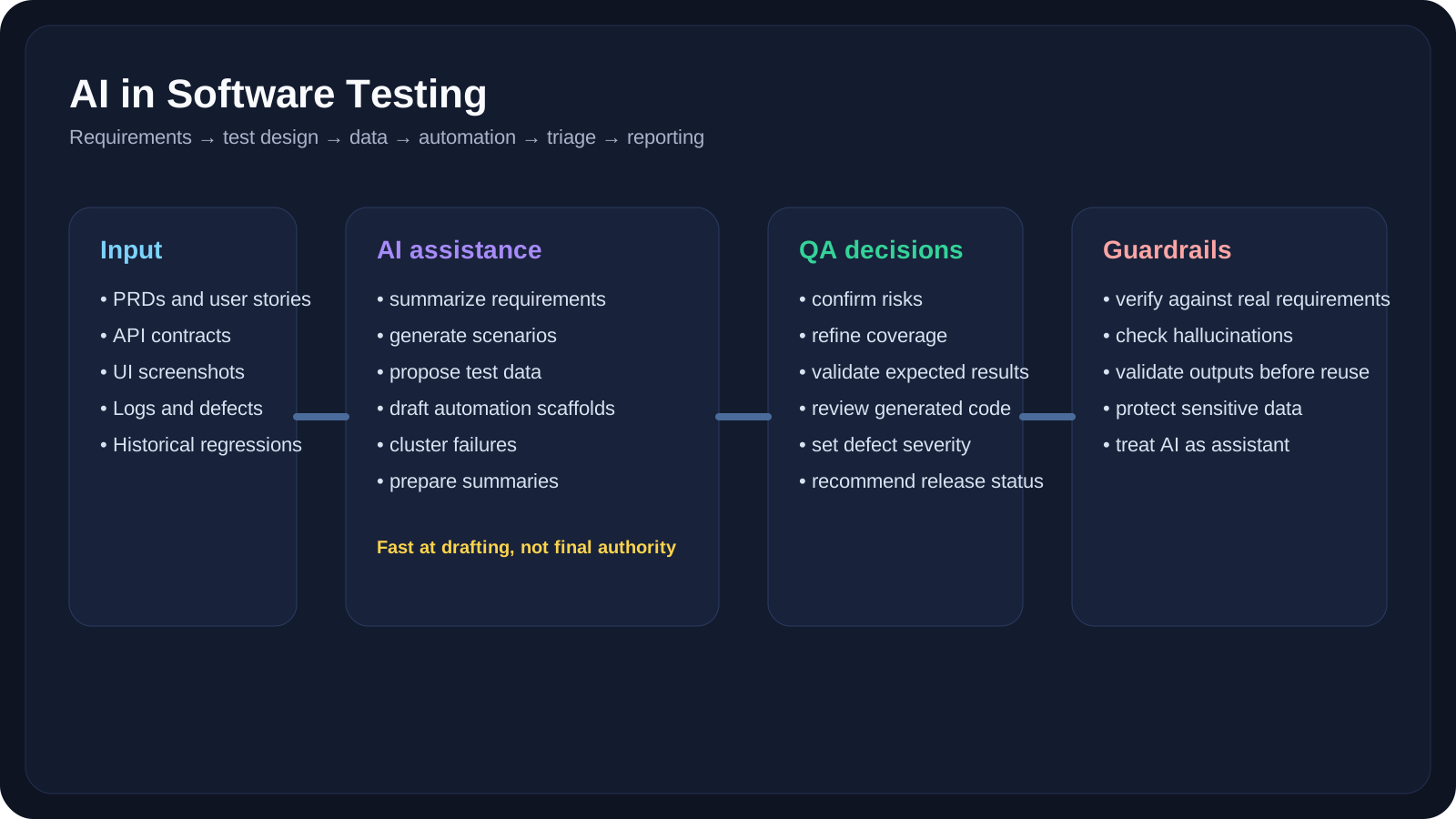
Use AI for requirement analysis, test planning, test case design, test data, API testing, UI testing, and defect analysis.
Overview
Level 6 focused on tools and practical AI-assisted workflows. Level 7 shifts from "Which tool should I use?" to "How should AI actually change my testing practice?"
This is the lesson where AI stops being an abstract capability and starts becoming part of the QA operating model. We will look at how AI helps across the software testing lifecycle: understanding requirements, identifying risks, generating test scenarios, preparing data, supporting automation, triaging failures, and communicating results.
The key idea is simple: AI can accelerate many QA activities, but it should not replace test thinking. Good QA still depends on domain knowledge, risk judgment, skepticism, and careful validation.
A Practical Note for QA Learners
If this topic feels broad, focus on these three ideas first:
- AI is strongest at drafting, summarizing, organizing, and expanding options
- QA still owns correctness, coverage, risk, and release confidence
- The best results usually come from AI + human review, not AI alone
If you remember those three principles, the rest of the lesson becomes much easier to apply.
Learning Goals
- Map AI to real testing activities across requirements, design, execution, analysis, and reporting
- Use AI safely for both manual QA and automation QA work
- Recognize where AI helps most and where human QA judgment still matters most
- Apply QA-friendly prompting patterns to generate useful outputs faster
- Design practical AI-assisted workflows for requirement review, test generation, defect triage, and release support
Core Concepts
Where AI Fits in the Testing Lifecycle
AI can support almost every testing phase, but the type of support changes by stage.
| Testing Stage | How AI Helps | What QA Still Must Own |
|---|---|---|
| Requirement analysis | Summaries, gap detection, clarification questions | Business intent, risk interpretation, missing constraints |
| Test planning | Coverage ideas, scope suggestions, risk clusters | Prioritization, release strategy, effort tradeoffs |
| Test design | Positive, negative, boundary, and alternate flows | Final coverage quality and scenario correctness |
| Test data | Synthetic records, edge-case payloads, data combinations | Rule validation, realism, privacy safety |
| API testing | Payload ideas, status expectations, contract scenarios | Real integration logic and environment behavior |
| UI testing | Scenario breakdown, locator ideas, visual-review prompts | Stable assertions, usability interpretation |
| Defect analysis | Log summaries, duplicate clustering, probable causes | Root cause confirmation and bug severity |
| Reporting | Test summaries, release notes, executive digests | Accuracy, nuance, and release recommendation |
What AI Is Good At
AI is especially useful when the work is:
- repetitive
- text heavy
- exploratory
- structure friendly
- synthesis oriented
That means AI is often strong at:
- turning long PRDs into shorter test-relevant summaries
- generating many candidate scenarios quickly
- spotting missing requirement details
- producing draft payload matrices
- summarizing logs and failures
- turning raw notes into polished reports
What AI Is Not Automatically Good At
AI should not be trusted by default for:
- deciding whether the product behavior is actually correct
- understanding hidden business politics or undocumented rules
- validating live system state without evidence
- judging whether a release is safe
- choosing the final severity of a defect
- understanding subtle user frustration from a weak UX
This is where QA expertise stays central.
AI Across the QA Workflow
1. Requirement Analysis
AI can read a requirement, user story, PRD, or meeting note and quickly produce:
- a concise summary
- missing assumptions
- ambiguous terms
- clarifying questions
- initial test risks
Example 1: Requirement summarization
You paste a two-page feature description into ChatGPT or Claude and ask:
1Summarize this feature from a QA point of view.2List:3- what the user can do4- what validations appear to exist5- what is unclear6- what needs clarification before testing startsThis is helpful because it converts noisy product language into a test-oriented draft.
Example 2: Ambiguity detection
Requirement says:
Users should see faster checkout recommendations.
AI can help surface the QA problem:
- what counts as "faster"?
- where are recommendations shown?
- are they personalized?
- what happens for anonymous users?
- what is the fallback if recommendations fail?
That does not replace QA thinking, but it accelerates the first-pass review.
2. Test Planning and Risk Identification
AI is useful when you need to move from a requirement to a test strategy draft quickly.
Example 3: Risk-based planning
Prompt:
1Act as a senior QA lead.2Given this feature description, identify:3- highest-risk areas4- areas suitable for smoke testing5- areas that need regression coverage6- areas that need non-functional testing7- questions that should be resolved before releaseThis helps manual QA teams draft a plan faster and gives automation engineers a better sense of where to invest effort.
Example 4: Test scope slicing
For a payment feature, AI can propose testing buckets like:
- happy path
- invalid card data
- retry flows
- timeout behavior
- currency formatting
- discount conflicts
- partial failure recovery
This is often a strong starting point for a test plan review meeting.
3. Test Case and Scenario Generation
This is one of the most immediately useful AI applications in QA.
AI can generate:
- positive cases
- negative cases
- boundary cases
- alternate flows
- state-based variations
- permission-based combinations
Example 5: Positive and negative test cases
Prompt:
1Generate test scenarios for a user registration form with:2- email3- password4- confirm password5- terms checkbox67Return:8- positive scenarios9- negative scenarios10- validation scenarios11- edge casesExample 6: Boundary analysis
If the form accepts passwords of length 8-64, AI can draft cases for:
- 7 characters
- 8 characters
- 64 characters
- 65 characters
- unicode characters
- spaces
- pasted values
Example 7: State transition coverage
For a shopping cart:
- cart empty -> item added
- item added -> quantity updated
- quantity updated -> coupon applied
- coupon applied -> payment started
- payment started -> payment fails
- payment fails -> cart preserved
AI is very good at turning state-oriented product logic into candidate test scenarios quickly.
4. Test Data Generation
AI can create realistic and diverse data faster than manual entry.
Example 8: Synthetic user profiles
Generate:
- active and inactive users
- users from different countries
- special-character names
- edge-case addresses
- different time zones
- high and low transaction histories
Example 9: API payload variations
Prompt:
1Generate 12 request payloads for an address update API.2Include:3- valid cases4- missing fields5- invalid country codes6- long strings7- unicode8- security-oriented payloads9Return expected result for each.This is useful for both manual API testing and automated suite generation.
5. API Testing Support
AI can help with:
- request matrix generation
- contract review prompts
- parameter combinations
- status-code expectation drafts
- error-path ideas
Example 10: Contract testing support
Paste an endpoint definition and ask AI to list:
- required fields
- optional fields
- invalid combinations
- likely
400,401,403,404, and409scenarios - business-rule conflicts
That gives a better first-pass API checklist before implementation begins.
6. UI Testing Support
AI can assist UI testing in both manual and automated contexts.
Example 11: UI scenario extraction
From a PRD or Figma description, AI can propose:
- entry-point scenarios
- navigation paths
- validation behavior
- disabled/enabled state checks
- empty-state scenarios
- responsive cases
Example 12: Visual review prompts
Upload screenshots to a multimodal model and ask it to inspect:
- layout overlap
- cut-off text
- missing buttons
- contrast issues
- inconsistent labels
This is particularly useful when a test passes functionally but still looks wrong visually.
7. Automation Drafting
AI does not remove the need for automation engineers, but it can dramatically reduce boilerplate work.
Example 13: Playwright test scaffolding
Prompt:
1Generate a Playwright TypeScript test for a login flow.2Use:3- page.goto()4- role-based locators5- explicit assertions6- comments for each step7Do not use brittle CSS selectors unless necessary.Example 14: API automation draft
Ask Copilot or ChatGPT to turn a request/response contract into:
- Postman test scripts
- Playwright API tests
- REST-assured tests
- fixture factories
The important point is that these outputs are drafts. QA automation engineers still need to improve stability, naming, waits, and assertions.
8. Defect Analysis and Triage
This is one of the most underrated AI use cases.
Example 15: Failure log summarization
Paste a failed test log and ask AI:
1Summarize this failure.2Return:3- likely failing step4- possible root causes5- environment clues6- whether it looks like product bug, flaky test, or test-data issueExample 16: Duplicate defect clustering
Give AI five similar bug reports and ask whether they appear to describe:
- the same defect
- the same root cause with different symptoms
- separate issues in the same workflow
That can speed up triage meetings significantly.
9. Documentation and Reporting
AI is often strongest at turning raw QA output into readable communication.
Example 17: Test summary drafting
AI can turn notes like:
- 42 test cases passed
- 3 failed
- 1 blocked by environment issue
- checkout coupon logic inconsistent on mobile
into a stakeholder-friendly summary in seconds.
Example 18: Release note drafting
AI can help organize:
- tested areas
- known risks
- open blockers
- regression status
- recommended go/no-go inputs
This is especially useful for QA leads and managers.
10. Exploratory Testing Support
AI can support exploratory testing by proposing charters and ideas.
Example 19: Exploratory charter generation
Prompt:
1Create 5 exploratory testing charters for a travel booking checkout page.2Include:3- payment flow4- pricing consistency5- seat selection6- promo code interactions7- mobile usabilityExample 20: "What am I missing?" prompt
After writing your initial tests, ask:
1Review this test list.2What important scenarios, risks, edge cases, or user states are still missing?That often surfaces blind spots faster than starting from scratch alone.
QA/SDET Relevance
Manual QA Perspective
Manual QA benefits most from AI when the work is:
- document heavy
- scenario heavy
- ambiguity heavy
- communication heavy
Practical wins:
- faster PRD review
- faster test idea generation
- clearer bug reports
- better regression checklists
- stronger exploratory charters
QA Automation Engineer Perspective
Automation engineers benefit most when AI is used for:
- scaffolding tests
- generating payloads
- reviewing locator strategies
- debugging failures
- producing fixtures and helper methods
Practical wins:
- less boilerplate
- faster framework iteration
- easier coverage expansion
- quicker failure diagnosis
SDET Perspective
SDETs usually get the most value from combining AI with system context.
Practical wins:
- architecture review prompts
- framework design support
- refactoring assistance
- contract-testing drafts
- CI pipeline reasoning
- observability and failure pattern analysis
Guardrails: AI Should Improve QA, Not Weaken It
AI-generated outputs are only useful if they are tested and reviewed.
Common Risks
- hallucinated product behavior
- invented validation rules
- missing business constraints
- overconfident but shallow bug explanations
- insecure test data generation
- prompt injection or unsafe tool use in AI-integrated workflows
What QA Should Validate
Before using AI output in real testing work, verify:
- Does this match the actual requirement?
- Are the scenarios technically possible?
- Are the expected results correct?
- Are the assertions measurable?
- Is the generated code stable and readable?
- Does any output create privacy, security, or compliance risk?
A Simple Review Rule
Use AI freely for:
- drafting
- brainstorming
- summarizing
- structuring
Require human review for:
- final coverage decisions
- defect severity
- release recommendations
- automation merge decisions
- anything security or compliance sensitive
Practical Work
Exercise 1: Turn a PRD into a QA Plan
Your task: Pick a real feature requirement and use AI to produce a first-pass QA test strategy.
Steps:
- Take a requirement or user story from your backlog.
- Paste it into ChatGPT or Claude.
- Use this prompt:
1Act as a senior QA engineer.2Review this requirement and produce:3- a feature summary4- risky areas5- missing clarifications6- positive scenarios7- negative scenarios8- boundary scenarios9- regression areas10- non-functional testing ideas- Review the result manually.
- Mark:
- what was useful
- what was shallow
- what was wrong
- what still required QA judgment
Exercise 2: Create an AI-Assisted Test Case Pack
Your task: Generate a structured set of test cases for one workflow.
Steps:
- Choose one workflow such as login, search, checkout, or account update.
- Ask AI to generate:
- positive cases
- negative cases
- permission-based cases
- boundary cases
- mobile or browser-specific cases
- Put the output into a table with:
- Test ID
- Scenario
- Preconditions
- Steps
- Expected Result
- Priority
- Remove duplicates and fix weak expected results.
Exercise 3: Compare Manual vs. AI Drafting Speed
Your task: Measure whether AI is actually helping your test design process.
Steps:
- Pick one feature.
- Write 10 test scenarios manually and time yourself.
- Ask AI to generate 10 more scenarios and time the iteration.
- Compare:
- speed
- coverage
- originality
- accuracy
- number of corrections needed
- Record one conclusion:
- where AI genuinely helped
- where it created extra review overhead
YouTube Resources
Reference Links
- NIST AI Test, Evaluation, Validation and Verification (TEVV)
- NIST AI RMF 1.0
- NIST Generative AI Profile
- OWASP LLM Prompt Injection Prevention Cheat Sheet
- OWASP Top 10 for LLM Applications
- Playwright Locators
- Playwright Auto-waiting
- OpenAI Prompt Guidance
- Why language models hallucinate
Key Takeaways
- AI is already useful across the QA lifecycle, especially for summarization, scenario generation, test data drafting, triage, and reporting.
- The best use of AI in testing is assistive, not autonomous. AI drafts; QA validates.
- Manual QA, automation QA, and SDET roles all benefit differently from AI, so workflows should be adapted by role.
- Scenario quality still depends on product understanding and risk thinking, which remain human strengths.
- Testing AI-assisted work requires its own guardrails, including review, evidence, validation, and security awareness.
Next Step
The next lesson narrows the focus from broad QA practice to the people who build automation every day. In AI for Automation Engineers, we will look at how AI helps generate Playwright, Selenium, Cypress, API, and SQL-based automation work more efficiently without losing engineering quality.