AI for Automation Engineers
Generate Selenium, Playwright, Cypress, API tests, and SQL validations from prompts and requirements.
Overview
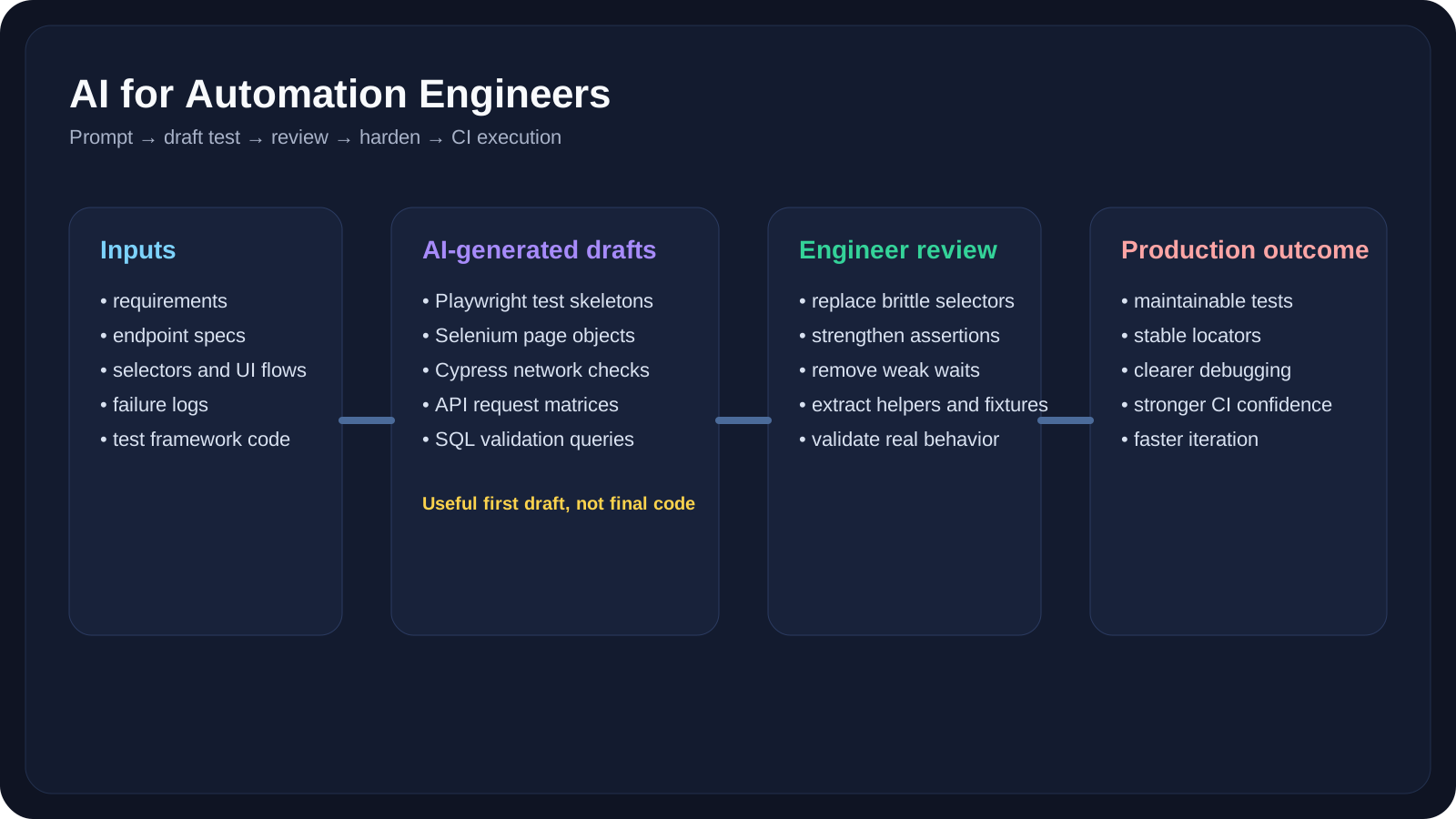
The previous lesson explained where AI fits into the QA lifecycle. This lesson narrows the focus to the people who build and maintain automated checks every day.
Automation engineers work in a very specific zone: they do not just need test ideas, they need:
- stable automation structure
- resilient selectors
- practical assertions
- maintainable fixtures
- reusable helpers
- test data strategies
- useful debugging output
That is where AI becomes most valuable. It can remove repetitive coding, speed up scaffolding, suggest missing cases, and help analyze failures. At the same time, it can also generate fragile selectors, weak assertions, duplicated helpers, and false confidence if you accept its first answer without engineering review.
This lesson is about using AI to make automation engineers faster without lowering technical quality.
It also acts as the hub lesson for the next few companion pages. We will start with the overall automation mindset here, then move into focused deep dives:
- Playwright and UI automation
- API testing and data validation
- debugging, refactoring, and CI feedback loops
- tool selection across ChatGPT, Claude, Copilot, and related workflows
A Practical Note for QA Automation Learners
If you want the short version, remember this:
- AI is excellent at drafting automation
- automation engineers still own reliability
- the best workflow is generate → review → harden → reuse
That mindset will keep this lesson practical instead of hype-driven.
Learning Goals
- Use AI to accelerate automation work across UI, API, SQL, fixtures, and helper utilities
- Apply AI safely in Playwright, Selenium, and Cypress workflows
- Improve prompts so generated automation is more stable and maintainable
- Recognize common AI-generated automation mistakes before they enter the test suite
- Build a repeatable AI-assisted automation workflow for drafting, review, debugging, and refactoring
Core Concepts
What Automation Engineers Actually Need from AI
Automation engineers usually do not need AI to "explain testing." They need AI to help with:
- turning requirements into first-pass tests
- generating boilerplate quickly
- transforming manual steps into automation structure
- drafting reusable fixtures and test data
- identifying missing assertions
- reviewing locator strategies
- debugging flaky failures
- refactoring low-quality test code
Where AI Helps Most
| Automation Task | AI Value | Human Engineer Still Owns |
|---|---|---|
| Test scaffolding | Fast first draft | Final structure, patterns, naming |
| Selector suggestions | Candidate locators | Resilience, readability, explicit contracts |
| Assertion generation | Coverage ideas | Correct business expectations |
| API test drafting | Request/response templates | Real contract logic and system behavior |
| SQL validation | Query scaffolds | Data correctness and schema meaning |
| Debugging | Failure summarization | Final root cause conclusion |
| Refactoring | Repetition removal | Framework consistency |
| CI help | Pipeline draft snippets | Security, runtime correctness, team standards |
The Best AI Workflow for Automation Engineers
Use this sequence:
- Describe the automation goal clearly
- Ask AI for a compact, structured first draft
- Review selectors, assertions, waits, and naming
- Refactor into page objects, helpers, or fixtures
- Run and debug against the real system
- Capture the hardened version as the reusable pattern
The mistake to avoid is copying AI output directly into the main branch as if it were already production quality.
AI for Playwright Automation
Playwright is one of the best places to use AI productively because the framework already encourages resilient patterns like locators and web-specific assertions. That aligns well with how we should prompt AI as well: ask for stable locators, explicit assertions, and readable steps instead of brittle shortcuts.
Example 1: Generate a Playwright test from a requirement
Prompt:
1Generate a Playwright TypeScript test for a login page.23Requirements:4- go to /login5- enter valid username and password6- click Sign in7- verify dashboard heading is visible89Use:10- test() and expect()11- role-based locators when possible12- explicit assertions13- comments for each step14- no brittle nth-child selectorsExpected output quality:
- reasonable structure
- good starting locators
- readable comments
- a usable first draft
Example 2: Ask AI to improve selectors
If AI initially generates:
1await page.locator('div > button:nth-child(2)').click()you should immediately ask a follow-up question:
1Rewrite these locators using Playwright best practices.2Prefer getByRole(), getByLabel(), or stable explicit contracts.3Explain why each locator is more reliable.This is where AI becomes more useful as a reviewer than as a one-shot generator.
Example 3: Generate page object structure
Prompt:
1Create a Playwright page object for a checkout page.2Include:3- locators4- methods for addCoupon, placeOrder, verifyTotal5- readable naming6- no test assertions inside the page objectThis is a good use of AI because it reduces scaffolding time while still leaving architectural decisions visible.
Example 4: Generate missing assertions
Prompt:
1Review this Playwright test.2Suggest assertions that are missing for:3- navigation outcome4- validation messages5- visible success state6- network-dependent confirmationThis often surfaces weak coverage in otherwise "working" tests.
AI for Selenium Automation
Selenium still matters in many enterprise automation stacks. That means AI should help you reinforce maintainability patterns such as page objects, reusable waits, and clear test layering rather than generate random, duplicated WebDriver code.
Example 5: Generate a Selenium test skeleton
Prompt:
1Generate a Selenium Java test for resetting a password.2Use:3- Page Object Model4- explicit waits5- clear method names6- assertions separated from low-level element accessExample 6: Refactor brittle Selenium code
If your old suite has repeated driver.findElement(...) blocks, ask:
1Refactor this Selenium test into:2- a page object3- reusable wait helpers4- cleaner assertion sections5Do not change the business behavior.This is useful when migrating legacy tests into something more maintainable.
Example 7: Improve waits
Prompt:
1Review this Selenium test and identify where explicit waits are more appropriate than fragile timing assumptions.2Explain why each wait matters.This is a practical way to reduce flakiness while learning from the AI output.
AI for Cypress Automation
Cypress is especially strong when tests rely on network visibility, request interception, and practical front-end flows. That makes it a good candidate for AI-assisted test drafting where both UI actions and backend calls matter.
Example 8: Generate a Cypress UI flow
Prompt:
1Generate a Cypress test for a product search flow.2Use:3- cy.visit()4- user-facing selectors5- assertions after interactions6- no fixed waits unless unavoidableExample 9: Draft network-aware assertions
Prompt:
1Create a Cypress test that verifies a checkout action triggers the expected POST request.2Use cy.intercept(), alias the request, and assert the response status.This is more useful than pure DOM-only checks because it ties UI behavior to backend activity.
Example 10: Generate visual-test support prompts
You can also ask AI to propose Cypress + visual testing combinations, such as:
- component-level snapshots
- element-level visual diffs
- cross-browser comparison strategy
That is especially useful for front-end heavy products.
AI for API Automation
API testing is one of the most efficient automation areas for AI because the structure is explicit:
- endpoint
- method
- request body
- headers
- status expectations
- response schema
Example 11: Create request matrix drafts
Prompt:
1Create API test scenarios for POST /users.2Include:3- valid payloads4- missing required fields5- invalid field formats6- auth failures7- duplicate data conflicts8- security-oriented payloads9Return expected status code for each.Example 12: Generate Playwright API tests
Prompt:
1Generate Playwright API tests using APIRequestContext for:2- creating a user3- reading the user4- updating the user5- deleting the user6Use clear assertions on status and response body.This is a natural fit for AI-assisted drafting because API tests have clearer structures, contracts, and expected status behaviors than many UI flows.
Example 13: Review contract completeness
Paste an OpenAPI fragment and ask:
1What API test cases are still missing?2Check:3- enum coverage4- invalid combinations5- null handling6- authorization states7- concurrency or conflict scenariosThis is a good way to expand beyond the first obvious positive flow.
AI for SQL and Data Validation
Automation engineers often need small SQL checks more often than full database theory.
AI can help generate:
- verification queries
- join-based validation checks
- cleanup scripts
- before/after assertions
- aggregate validation queries
Example 14: Generate validation SQL
Prompt:
1Write SQL queries to validate that placing an order:2- creates one order row3- creates at least one order_item row4- updates customer last_order_at5- stores the correct order total6Assume PostgreSQL.Example 15: Generate negative-state checks
Prompt:
1Write SQL checks to confirm a failed payment attempt does NOT:2- mark the order as paid3- reduce inventory4- create shipment recordsThis is a high-value use case because it improves backend confidence quickly.
AI for Refactoring and Framework Growth
Automation engineers spend a lot of time not just writing tests, but improving the test system itself.
Example 16: Extract reusable helpers
Prompt:
1Review this Playwright suite and suggest:2- duplicate setup logic3- common assertions that can become helpers4- repeated navigation code5- fixture candidatesExample 17: Improve naming and readability
Prompt:
1Rewrite these tests with better naming.2Improve:3- test titles4- helper method names5- variable names6- comment quality7Do not change behavior.Example 18: CI-aware generation
Prompt:
1Generate a GitHub Actions workflow for Playwright tests.2Include:3- dependency install4- browser install5- test execution6- artifact upload for traces on failureThis saves time, but the engineer still needs to review secrets handling, runtime cost, and caching strategy.
AI for Failure Analysis and Flake Reduction
This is one of the best real-world uses of AI for automation engineers.
Example 19: Summarize a flaky failure
Prompt:
1Analyze this failing Playwright test output.2Return:3- likely failing step4- probable cause5- whether this looks like app bug, environment issue, or flaky test6- recommended next debugging stepExample 20: Distinguish product bug from locator issue
Paste:
- the failing locator
- screenshot
- error message
- recent DOM snippet
Ask AI:
1Does this failure look like:2- wrong selector3- page timing issue4- real product defect5- changed content or accessibility name6Explain your reasoning.This does not replace debugging, but it reduces wasted investigation time.
Common AI-Generated Automation Mistakes
Automation engineers need to learn what to reject quickly.
Mistake 1: Brittle selectors
Examples:
nth-child- long CSS chains
- random generated class names
Mistake 2: Weak assertions
Examples:
- checking only URL, not page state
- checking only visibility, not business outcome
- checking broad text instead of exact behavior
Mistake 3: Hidden waits
Examples:
- unnecessary fixed sleeps
- vague retry wrappers
- no understanding of actionability or explicit wait conditions
Mistake 4: Boilerplate duplication
Examples:
- repeated setup in every test
- no fixtures
- no page objects or reusable helpers
Mistake 5: Confident but wrong assumptions
Examples:
- assuming endpoint contracts
- inventing field names
- assuming authentication flow
- assuming UI labels that do not exist
Prompt Patterns That Work Best for Automation Engineers
Pattern 1: "Generate but constrain"
1Generate a Playwright test for this flow.2Constraints:3- use getByRole() where possible4- use explicit assertions5- avoid fixed waits6- keep the code under 40 linesPattern 2: "Review and improve"
1Review this automation test.2Identify:3- flaky patterns4- missing assertions5- weak selectors6- opportunities to extract helpersPattern 3: "Refactor without changing behavior"
1Refactor this test suite for maintainability.2Do not change the intended business behavior.3Focus on reuse, naming, and stability.Pattern 4: "Return structured output"
Use structured output requests when generating:
- test case tables
- API matrices
- SQL checks
- reusable automation tasks
This reduces cleanup work because the model is less likely to mix prose, code, and partial tables in the same answer.
Reference Links
QA/SDET Relevance
Manual QA Perspective
Manual testers can benefit indirectly from this lesson by learning how to provide clearer automation-ready inputs:
- cleaner acceptance criteria
- stronger scenario descriptions
- reproducible bug steps
- better expected results
Automation QA Engineer Perspective
This lesson is directly aimed at automation QA engineers. The biggest wins are:
- faster scaffolding
- broader coverage
- better debugging
- quicker framework cleanup
- less boilerplate fatigue
SDET Perspective
SDETs can go even further:
- use AI for framework design reviews
- generate internal test DSL ideas
- refine CI/CD workflows
- review large test suites for architectural weaknesses
Practical Work
Exercise 1: Generate a Better Playwright Draft
Your task: Use AI to generate a Playwright test, then improve it.
Steps:
- Choose a simple product workflow such as login, search, or checkout.
- Ask ChatGPT, Claude, or Copilot to generate a Playwright test.
- Review the draft for:
- selector quality
- missing assertions
- hardcoded waits
- readability
- Rewrite the test into a stronger version.
- Compare the original AI draft with your improved version.
Exercise 2: Create an API Test Matrix
Your task: Use AI to generate API automation cases for one endpoint.
Steps:
- Pick an endpoint from your product or a public test API.
- Ask AI for:
- valid cases
- invalid cases
- auth cases
- conflict cases
- security-oriented cases
- Convert the result into either:
- Playwright API tests
- Postman checks
- REST-assured code
- Mark which cases are:
- immediately usable
- useful but incomplete
- wrong or unsafe
Exercise 3: Debug One Failure with AI
Your task: Use AI to shorten one debugging loop.
Steps:
- Take one failed test log from your suite.
- Paste:
- failing step
- error message
- locator or request details
- screenshot or DOM snippet if available
- Ask AI for:
- likely cause
- classification (flake, selector, app bug, data issue)
- next debugging step
- Compare AI’s diagnosis with the real fix.
- Record one lesson about where AI helped and where it guessed.
YouTube Resources

Reference Links
- Playwright Best Practices
- Playwright Locators
- Playwright Assertions
- Playwright API Testing
- Selenium Page Object Models
- Selenium Design Strategies
- Selenium Waits
- Cypress Best Practices
- Cypress Network Requests Guide
- Cypress intercept
- Structured model outputs
- Prompt guidance
Key Takeaways
- AI can make automation engineers much faster, especially for scaffolding, matrix generation, debugging, and refactoring support.
- The highest-value AI workflow is not "generate and trust" but "generate, review, and harden."
- Playwright, Selenium, Cypress, API, and SQL workflows all benefit differently from AI, so prompts should be tool-aware.
- Reliability still depends on good engineering patterns such as resilient locators, explicit assertions, maintainable structure, and clean waits.
- Automation quality improves when AI output is treated as a draft artifact, not a final framework decision.
Companion Deep Dives
If you want deeper workflow-specific coverage, continue with these companion lessons:
- AI for Playwright and UI Automation
- AI for API Testing and Data Validation
- AI for Debugging, Refactoring, and CI
Next Step
The next lesson narrows into the first automation deep dive: AI for Playwright and UI Automation. We will apply the same generate → review → harden workflow specifically to UI tests, locators, assertions, and reusable Playwright structure.