Model Context Protocol (MCP) for Agents
Learn the role of MCP in connecting agents to tools, data sources, filesystems, services, and developer workflows.
Overview
The previous lesson explained how agents use tools, memory, state, and planning. This lesson focuses on one of the most practical questions in modern agent systems:
How do agents connect to real tools and data sources in a standardized way?
That is the problem MCP tries to solve.
Model Context Protocol, usually called MCP, is an open standard for connecting AI applications to external systems. Anthropic’s introduction described it as a standard way to create secure, two-way connections between data sources and AI-powered tools. The official MCP docs use a similar framing: MCP is a standard that lets AI applications connect to external systems, tools, resources, and workflows in a more structured way.
For QA teams, that matters because useful agents often need access to:
- repositories
- test reports
- requirement documents
- bug trackers
- browser tools
- API environments
- release dashboards
Without a consistent integration model, every agent workflow becomes harder to build, test, and maintain.
A Practical Note for QA Learners
You do not need to implement a protocol stack to benefit from this lesson.
The real goal is simpler:
- understand what MCP is for
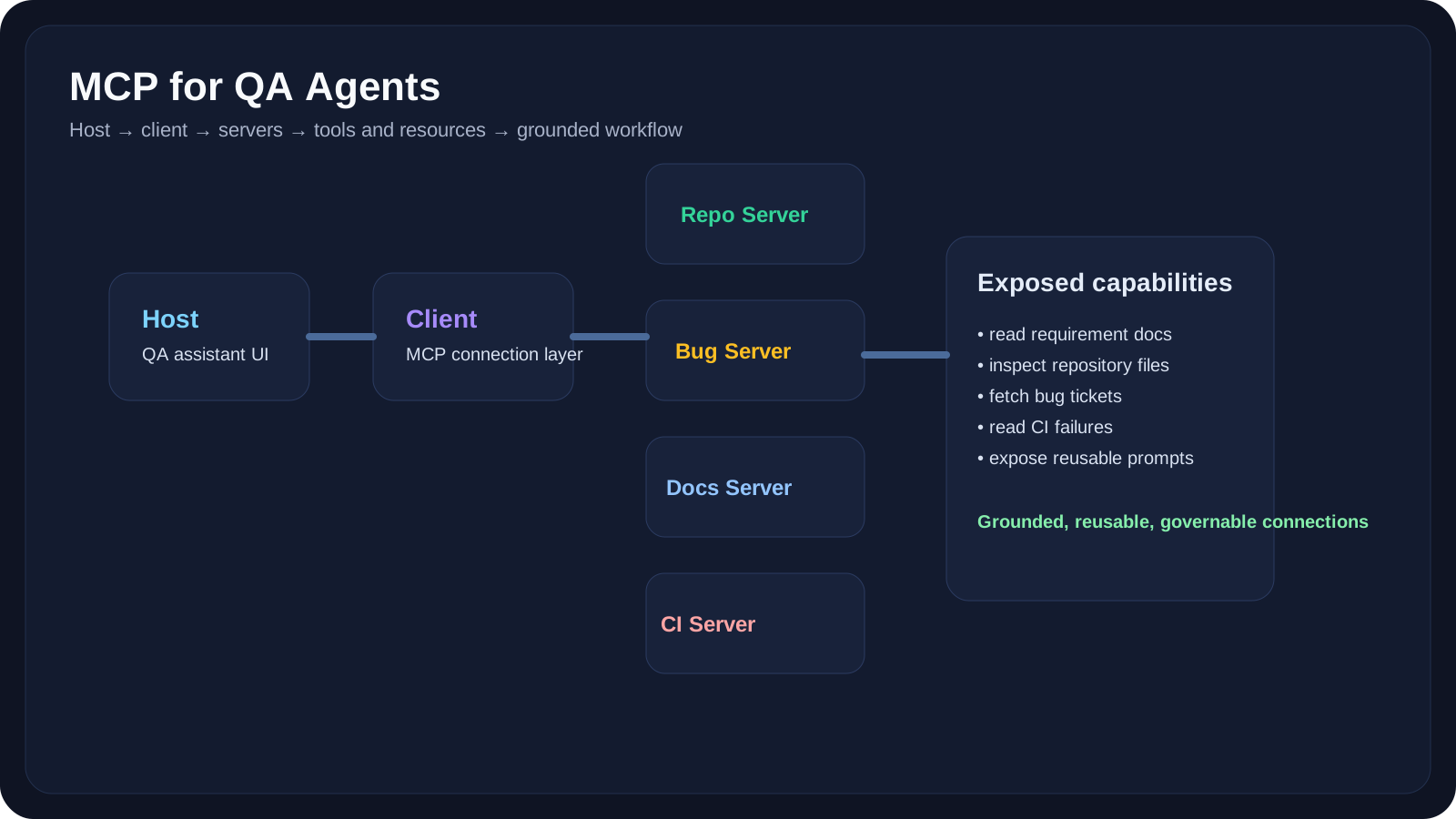
- understand the host/client/server mental model
- understand where it helps QA workflows
- understand the operational risks of exposing too many capabilities
Learning Goals
- Explain what MCP is and what problem it solves
- Understand the MCP mental model of hosts, clients, servers, tools, resources, and prompts
- Map MCP concepts to QA and engineering workflows
- Recognize when MCP is useful versus when direct application integrations are enough
- Identify security and governance concerns for tool-connected agent systems
Core Concepts
Why Agent Connectivity Is Hard
An agent becomes useful when it can reach useful systems.
But that creates a real engineering problem:
- one tool exposes a filesystem
- another exposes a browser
- another exposes issue-tracker data
- another exposes repository context
- another exposes prompts or reusable workflows
If every integration uses a custom shape, the whole stack becomes harder to:
- build
- reuse
- audit
- secure
- debug
That is where MCP becomes valuable. It provides a common pattern for exposing capabilities to agentic systems.
A Practical MCP Definition
For this course, use this working definition:
MCP is a standard way for AI applications to discover and use external capabilities such as tools, resources, and prompts through a structured client-server model.
That definition is enough to understand why MCP matters to QA agents.
The MCP Mental Model
The official docs describe a few core pieces that matter most:
Host
The host is the application where the user experience lives.
Examples:
- an IDE
- a coding assistant
- a desktop agent app
- an internal QA assistant interface
Client
The client is the MCP-aware component inside the host that speaks to MCP servers.
It handles things like:
- capability discovery
- request/response exchange
- tool invocation
Server
The server exposes useful capabilities.
Examples:
- repository server
- browser automation server
- ticketing server
- documentation server
- test-results server
Tools
Tools are callable actions.
Examples:
- search a document set
- run a test
- fetch a ticket
- validate a payload
Resources
Resources expose data or context that can be read.
Examples:
- requirement files
- markdown docs
- schema files
- logs
- release notes
Prompts
MCP can also expose reusable prompt templates or structured interaction entry points.
That matters because teams often need repeatable AI workflows, not just raw tool access.
Why This Matters for QA
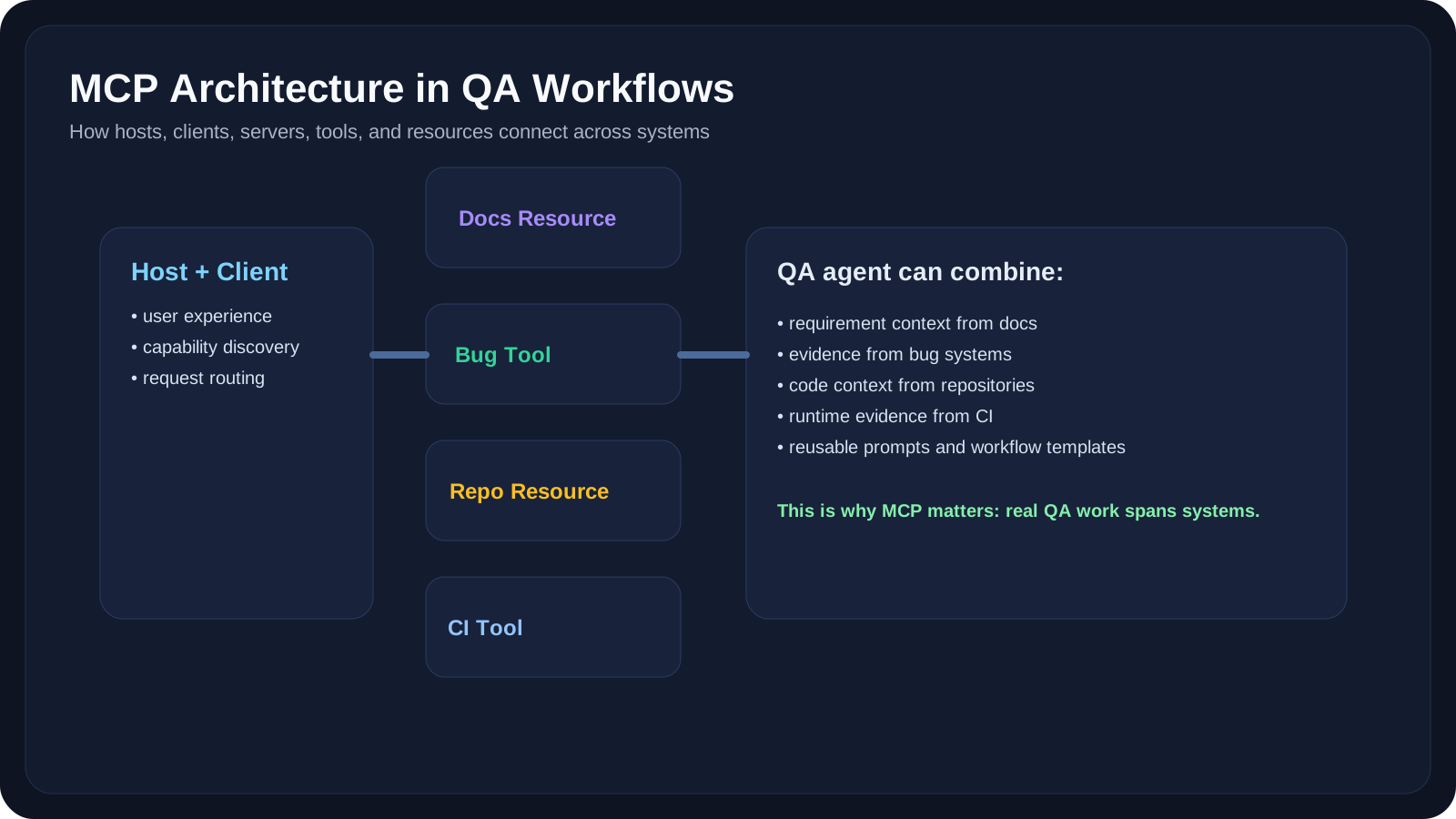
A QA-oriented agent may need to combine:
- requirement reading
- bug history lookup
- browser inspection
- CI failure reports
- repository context
MCP helps organize this capability surface so that the AI application does not need a completely custom integration story for each source.
That does not mean MCP is required for every QA project. It means it becomes especially useful when:
- the agent must access many systems
- the same integrations should be reusable across tools
- the team wants clearer operational boundaries
When MCP Helps
Good MCP Scenarios
Scenario 1: QA Knowledge Assistant
The agent needs:
- product docs
- testing standards
- release notes
- bug-triage guidelines
MCP helps because resources and prompts can be exposed in a more consistent format.
Scenario 2: Defect Triage Workflow
The agent needs:
- bug ticket data
- logs
- screenshots
- repository change context
MCP helps because these inputs may come from several independent systems.
Scenario 3: Automation Debug Assistant
The agent needs:
- CI logs
- traces
- repo files
- flaky-failure history
This is exactly the kind of cross-system workflow where standardized connectivity becomes attractive.
When MCP Is Probably Overkill
MCP may be unnecessary when:
- the workflow touches only one local data source
- the application already has a stable direct integration
- the task is small and prompt-only
- the team is still validating the use case
For example:
- summarizing one bug report
- rewriting release notes
- generating a small test-case table from pasted content
These tasks usually do not justify a protocol layer.
10 QA-Friendly Examples
Example 1: Repo-Aware Test Review Assistant
MCP servers could expose:
- repository files
- pull request diffs
- test utility docs
The agent can then explain which test areas may need updates after a code change.
Example 2: Requirement-to-Test Agent
MCP resources:
- PRD folder
- acceptance criteria docs
- historical test templates
The agent uses them to generate a first-pass QA plan with grounded context.
Example 3: Bug Triage Agent
MCP tools:
- fetch ticket
- fetch screenshot
- fetch similar issues
- read recent release notes
This reduces the chance of guessing in isolation.
Example 4: CI Failure Investigator
MCP tools/resources:
- CI log reader
- trace artifact reader
- test history lookup
This lets the agent gather evidence before making a diagnosis.
Example 5: Environment Readiness Assistant
MCP tools:
- verify service health
- inspect feature flags
- check seeded data
This is useful for pre-test validation workflows.
Example 6: API Change Review Agent
MCP resources:
- schema files
- API docs
- current contract tests
The agent can highlight likely coverage gaps after a spec change.
Example 7: Release Evidence Collector
MCP resources:
- test dashboards
- open bug lists
- deployment notes
The agent can build a release summary draft from real evidence sources.
Example 8: QA Onboarding Assistant
MCP resources:
- team handbook
- test strategy docs
- framework structure docs
This gives new engineers grounded help without inventing process details.
Example 9: Security-Conscious Agent
MCP access may be intentionally limited to:
- read-only docs
- read-only logs
- no production write actions
This is an example of good safety design.
Example 10: Approval-Gated Action Agent
The agent may be allowed to:
- draft a bug
- draft a summary
- gather context
but not:
- close a ticket
- merge a PR
- trigger production actions
That is often the right maturity level for QA teams.
Security and Governance
MCP increases capability, which also increases risk.
Common Risks
- exposing too much repository access
- allowing unsafe write operations
- leaking private data into prompts
- mixing trusted and untrusted sources
- making approval boundaries unclear
Good QA-Side Guardrails
- prefer read-only access first
- expose the minimum tool surface
- require approval before high-impact actions
- log which tools were called
- inspect what data the agent can retrieve
This is especially important when a QA assistant can access:
- customer data
- internal release artifacts
- production incident notes
- authentication-related configurations
Practical Work
Exercise 1: Map a QA Agent’s Capability Surface
Choose one agent idea such as:
- flaky-test investigator
- PRD review assistant
- release summary assistant
List:
- which systems it needs to read
- which tools it needs to call
- which actions should remain read-only
- which actions require explicit approval
Exercise 2: Design a Minimal MCP Setup
For one QA use case, define:
- one host
- one client
- two servers
- three tools
- two resources
Then explain why you chose that minimum set instead of exposing everything.
Exercise 3: Find the Over-Exposure Risk
Take your design from Exercise 2 and identify:
- one tool that is too powerful
- one resource that may leak sensitive data
- one approval point that must remain human
Reference Links
- Model Context Protocol Intro
- Introducing the Model Context Protocol - Anthropic
- What is MCP? - Google Cloud
- OpenAI Agents SDK Integrations and Observability
- MCP Python SDK GitHub
- MCP TypeScript SDK GitHub
YouTube Resources
- Model Context Protocol (MCP) Explained in 20 Minutes
- Build MCP Servers with Python FastMCP
- What is MCP and Why It Matters for AI Agents
Key Takeaways
- MCP gives AI applications a more standardized way to connect to tools, resources, and prompts.
- The host, client, server, tool, and resource model is enough to reason about most MCP-based QA workflows.
- MCP becomes most useful when agent workflows span many systems, not for every simple prompt use case.
- Capability design is also risk design, so read-only access, approvals, and logging matter from the beginning.
- For QA teams, MCP is valuable because real testing workflows are cross-system by nature.
Next Step
The next lesson moves from connectivity to durability: Stateful and Long-Running Agents explains how agents pause, resume, and keep track of work over time.