Tool Calling, Memory, and Planning
Understand the core agent building blocks: tool use, short-term and long-term memory, state, and planning loops.
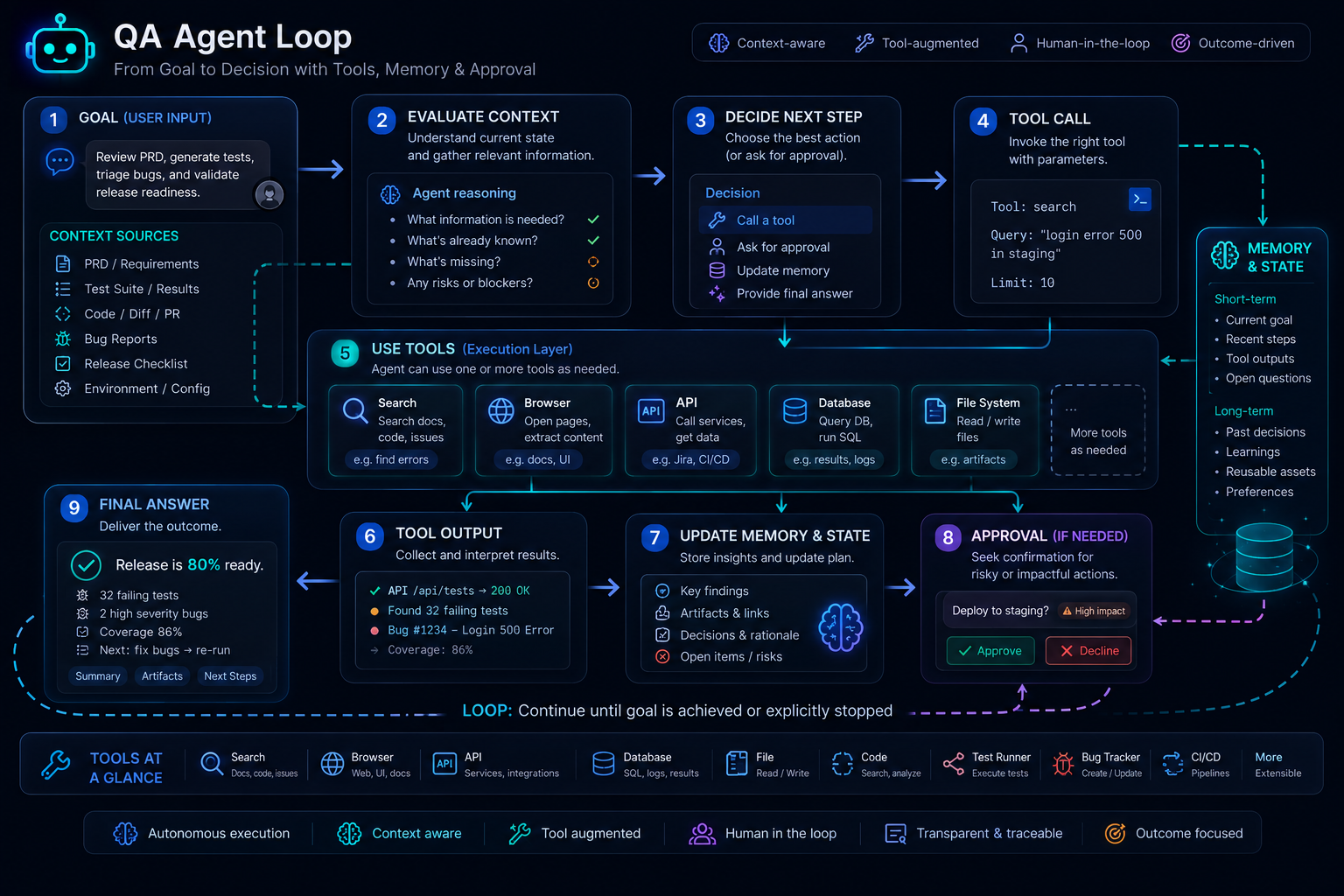
Overview
The previous lesson answered a foundational question:
What is an AI agent?
This lesson answers the next question:
What are the core parts that make an agent actually work?
Most agents are not mysterious systems hidden behind one huge prompt. In practice, they are built from understandable pieces:
- tool calling
- context and memory management
- state tracking
- planning loops
- stopping and approval rules
If you understand those pieces, you can reason about agents like an engineer instead of treating them like magic.
That matters a lot for QA teams. When an agent helps with requirement analysis, defect triage, test generation, or release coordination, you need to know:
- what information it can access
- what actions it can take
- what it remembers
- how it decides the next step
- where human review must interrupt the loop
A Practical Note for QA Learners
For this lesson, keep one idea in mind:
- tool calling gives the agent reach
- memory and state give the agent continuity
- planning gives the agent direction
Those three ideas explain most of what makes an agent feel more capable than a single prompt.
Learning Goals
- Explain how tool calling differs from plain text generation
- Distinguish prompt context, short-term memory, long-term memory, and durable state
- Understand why planning loops exist and how they differ in complexity
- Apply these concepts to QA workflows such as PRD review, flaky-test investigation, and release readiness
- Recognize when complexity is justified and when a simpler workflow is better
Core Concepts
Why Agents Need More Than a Prompt
A normal prompt-response interaction is often enough for:
- rewriting a defect
- summarizing notes
- generating a small list of tests
But once the task becomes multi-step, the system may need to:
- fetch new information
- remember what already happened
- decide which action to take next
- pause and wait for approval
That is where tool calling, memory, and planning become necessary.
OpenAI’s current tools guidance frames this directly: when generating responses or building agents, you can extend model capability with tools such as function calling, built-in tools, deferred tool loading, and remote MCP connections. Anthropic’s context-engineering work makes the complementary point: once agents operate over multiple turns, the real problem becomes how to manage the whole evolving context state rather than only writing a clever prompt.
1. Tool Calling
What Tool Calling Means
Tool calling is the mechanism that lets a model request outside help instead of pretending it already knows everything.
Examples:
- search the web
- read a file
- inspect a bug ticket
- query a database
- open a browser page
- run a validation function
In OpenAI’s function-calling model, a tool is functionality your application makes available, and a tool call is the model’s request to use that functionality. The actual tool execution still happens in your application or runtime.
That distinction is important:
- the model chooses the tool
- your system executes the tool
- the tool output goes back into the loop
The model is not directly operating the world by itself.
Plain Text vs Tool Calling
Without tool calling:
- the model can only answer from the prompt and its internal knowledge
With tool calling:
- the model can ask for fresh data
- inspect real system outputs
- use application-owned capabilities
That makes a large difference in QA work.
Example:
Prompt-only system:
Generate test scenarios for this API.
Tool-aware system:
- read OpenAPI file
- inspect existing contract tests
- compare changed schema fields
- generate missing scenarios
- export structured output
The second system has access to much better evidence.
Common Tool Types
For this course, it helps to think of tools in four broad groups:
Information tools
Used to retrieve context:
- web search
- file search
- repository access
- test-report lookup
- defect tracker lookup
Action tools
Used to do something:
- create a ticket
- run a script
- trigger a test job
- call an API
Validation tools
Used to check or score:
- schema validation
- SQL verification
- assertion checks
- environment health checks
Orchestration tools
Used to coordinate systems:
- queue next task
- hand off to another agent
- store state
- request approval
Tool Calling Flow
Most tool-calling loops look like this:
- send the goal and available tools to the model
- the model decides whether a tool is needed
- the system executes the selected tool
- the tool output is returned to the model
- the model decides whether to stop or continue
That may happen once, or many times in a row.
QA Example: Flaky-Test Investigator
The model receives:
- a failed CI job summary
- available tools:
- fetch trace
- read screenshot
- inspect historical failures
- read changed files
The agent may then:
- read the trace
- inspect the screenshot
- compare with prior failures
- classify the issue as likely:
- locator drift
- timing issue
- environment issue
- product regression
- stop and ask a human to confirm
That is a real tool-using workflow, not just a one-shot answer.
2. Context, Memory, and State
This is where many learners get confused, so we will separate the concepts clearly.
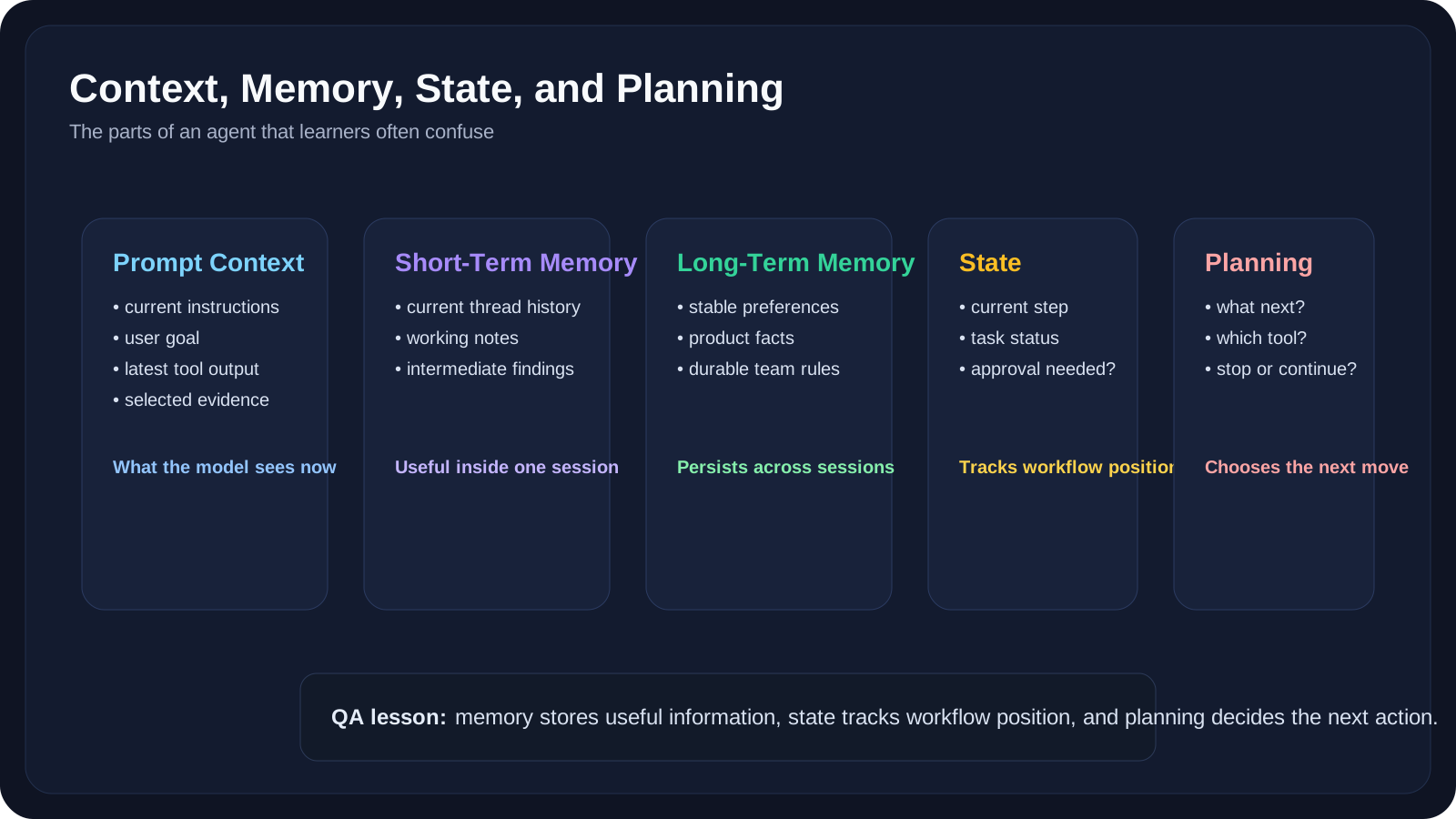
Prompt Context
Prompt context is the information currently sent to the model.
That may include:
- system instructions
- user input
- tool results
- retrieved documents
- message history
Anthropic’s context-engineering guidance is useful here: context is not just "the prompt text." It is the full token set available to the model at that turn.
Chat History
Chat history is the ongoing conversational record.
It is helpful, but it is not enough for serious agents because:
- it gets long
- it becomes noisy
- old content may distract the model
- not all operational state should live in free-form conversation text
Short-Term Memory
Short-term memory helps the system remember what happened in the current thread or session.
According to LangGraph’s memory model, this thread-scoped memory is typically managed as part of the agent’s state and can be resumed through persisted checkpoints.
In practical QA terms, short-term memory might include:
- the current requirement under review
- extracted risk notes
- the last retrieved bug cluster
- the current step in a release workflow
Long-Term Memory
Long-term memory persists information across sessions.
Examples:
- a team’s preferred test template style
- product-specific domain facts
- reusable QA rules
- persistent user or project preferences
This is useful, but it is also risky if the system stores low-quality or stale assumptions.
Retrieved Knowledge
Retrieved knowledge is not the same as memory.
Retrieved knowledge usually comes from:
- a document store
- a knowledge base
- previous reports
- repository files
It is fetched because it is relevant now, not because the agent "remembers" it naturally.
Durable State
Durable state tracks where the workflow is and what has already happened.
Examples:
PRD_REVIEW_STARTEDAMBIGUITIES_EXTRACTEDTEST_CASE_DRAFT_READYAWAITING_HUMAN_APPROVAL
This is crucial for long-running agents, and we will go deeper in the next lessons.
In QA systems, durable state matters because it prevents confusion like:
- re-running completed steps
- skipping approvals
- hallucinating that a validation already happened
- losing track of release stage
Why This Distinction Matters
If you put everything into chat history, the system becomes:
- expensive
- noisy
- hard to resume
- hard to inspect
If you separate:
- context
- memory
- retrieved knowledge
- state
the system becomes much easier to reason about and debug.
3. Planning
What Planning Means
Planning is how the agent decides what to do next.
This does not always mean a giant formal plan. Sometimes it is as simple as:
- "I need to read the PRD first"
- "Now I need the latest failing trace"
- "I have enough evidence, stop and ask for approval"
Planning becomes more important when:
- the task has multiple possible paths
- the agent must choose among tools
- the system may need to retry or revise
- the workflow is too large for one inference step
Four Common Planning Styles
1. One-step execution
Best for:
- simple tool use
- one small action
Example:
- get one bug ticket
- summarize it
2. Plan then act
Best for:
- tasks where the full sequence can be sketched first
Example:
- review PRD
- gather related bugs
- draft tests
- export summary
3. Observe then revise
Best for:
- tasks where tool output changes the next action
Example:
- inspect trace
- realize there is missing screenshot data
- fetch screenshot
- then reclassify
4. Approval-gated planning
Best for:
- risky or high-impact tasks
Example:
- generate release recommendation draft
- stop before publishing
- require QA lead approval
Why Planning Can Go Wrong
Planning adds power, but it also adds failure modes:
- too many loops
- unnecessary tool calls
- premature conclusions
- unclear stop conditions
- repeated work
For QA systems, the safest rule is:
The agent should only plan as much as the task actually needs.
Not every task deserves a complex planner.
10 QA-Friendly Examples
Example 1: PRD Review Agent
Needs:
- document-reading tool
- requirement extraction
- ambiguity list
- possible follow-up questions
Key concepts:
- tool calling
- short-term memory
- approval gate
Example 2: Bug Triage Agent
Needs:
- issue reader
- log parser
- screenshot analyzer
- likely severity draft
Key concepts:
- tool calling
- observe then revise
Example 3: Regression Planner
Needs:
- changed-files input
- mapping to impacted features
- test-suite recommendations
Key concepts:
- planning
- stateful workflow
Example 4: API Coverage Reviewer
Needs:
- schema reader
- contract diff checker
- scenario generator
Key concepts:
- tool calling
- retrieved knowledge
Example 5: Flaky-Test Investigator
Needs:
- CI log access
- trace access
- historical failure lookup
Key concepts:
- tool calling
- planning
- stop when evidence is weak
Example 6: Environment Readiness Agent
Needs:
- ping service
- check database
- verify feature flags
- confirm seed data
Key concepts:
- action tools
- validation tools
- one-step or small-plan execution
Example 7: Test Data Coordinator
Needs:
- data generation rules
- privacy constraints
- environment-specific constraints
Key concepts:
- long-term memory
- validation
Example 8: Release Readiness Agent
Needs:
- open-defect lookup
- test-summary retrieval
- pipeline status
- risk-note aggregation
Key concepts:
- multi-step planning
- durable state
- approval-gated stop
Example 9: Automation Refactoring Assistant
Needs:
- repository read access
- duplicate helper detection
- fixture recommendations
Key concepts:
- context engineering
- structured tool use
Example 10: QA Knowledge Assistant
Needs:
- document retrieval
- project-specific rules
- persistent memory for team conventions
Key concepts:
- retrieved knowledge
- long-term memory
Practical Work
Exercise 1: Map the Tool Loop
Choose one QA scenario such as:
- PRD review
- flaky-test triage
- release summary drafting
Write down:
- the goal
- the tools the agent needs
- what each tool returns
- where the system should stop
Then answer:
- which parts require live evidence?
- which parts could still be done with a simple prompt?
Exercise 2: Separate Memory from State
Take one example workflow and label each item as one of these:
- prompt context
- short-term memory
- long-term memory
- retrieved knowledge
- durable state
Example items:
- current PRD text
- product glossary
AWAITING_APPROVAL- last bug screenshot
- preferred test-case format
Exercise 3: Choose the Right Planning Style
For each of these tasks, choose the simplest planning style that fits:
- summarize one defect
- generate tests from a PRD and export a table
- inspect a failed run and gather more evidence if needed
- coordinate release-readiness notes across systems
Then explain why a more complex planner would be unnecessary or risky.
Reference Links
- OpenAI Function Calling Guide
- OpenAI Tools Guide
- Anthropic: Effective Context Engineering for AI Agents
- LangChain Memory Overview
- LangGraph Overview
- Microsoft Semantic Kernel / Agent Framework GitHub
- Microsoft Agent Framework Case Study: Automated GitHub Code Reviews
YouTube Resources
- OpenAI Function Calling - AI Agents SDK
- Function Calling is All You Need - Workshop
- Building AI Agent Workflows with Semantic Kernel
Key Takeaways
- Tool calling lets agents reach beyond the prompt and work with fresh data, external systems, and application-owned capabilities.
- Context, memory, retrieved knowledge, and durable state are not the same thing, and serious agent systems should separate them carefully.
- Planning is just next-step decision-making, but the style of planning should match the actual task complexity.
- QA agent quality depends on evidence, boundaries, and stopping rules, not on autonomy alone.
- This lesson gives you the engineering vocabulary needed for the rest of Level 8, especially MCP, long-running state, and orchestrated workflows.
Next Step
The next lesson, Model Context Protocol (MCP) for Agents, will focus on how agents connect to tools and external systems using a more standardized integration model.