AI Agents
Learn what AI agents are, how they differ from workflows and chatbots, and where they fit in QA and engineering practice.
Overview
Level 7 focused on using AI directly in QA work: test design, automation support, debugging, CI, and framework thinking. Level 8 introduces the next step in maturity: AI systems that can choose actions across multiple steps instead of only returning one answer.
That is the idea behind an AI agent.
An agent is not just "a chatbot with a fancy name." An agent is a system that can:
- receive a goal
- reason about what to do next
- use tools
- inspect results
- continue working until it reaches a stopping point
In practice, this means an agent may:
- read a requirement
- identify ambiguity
- call search or retrieval tools
- draft test scenarios
- ask for approval
- continue with the next task
This lesson gives you the mental model you need before we move into tool calling, state, MCP, orchestration, and multi-agent systems in the rest of Level 8.
A Practical Note for QA Learners
Many people hear the word agent and imagine a magical autonomous worker that can replace a whole team. That is not the right mindset for this course.
For QA work, a better mindset is:
- an agent is a structured AI system
- it can help coordinate work across steps
- it still needs boundaries, tools, evidence, and human review
If you keep that framing in mind, the topic becomes much easier to understand.
Learning Goals
- Define what an AI agent is in practical engineering terms
- Distinguish agents from chatbots, scripts, and fixed workflows
- Understand why tool use, iteration, and state matter
- Recognize when agentic design is useful for QA teams
- Avoid common misconceptions about autonomy, reasoning, and reliability
Core Concepts
What Makes a System an Agent?
A simple prompt-response system works like this:
- user asks a question
- model replies
- interaction ends
An agentic system can go further:
- receive a goal
- decide what information is missing
- use a tool or data source
- inspect the result
- choose the next action
- stop when the task is complete or when human approval is needed
That multi-step loop is what makes the system feel agentic.
According to OpenAI’s current agent guidance, agents are applications that can plan, call tools, collaborate across specialists, and keep enough state to complete multi-step work. Anthropic’s engineering guidance similarly emphasizes that the most effective agents are usually built from simple, composable patterns, not from overly complex abstractions.
A Practical Working Definition
For this course, we will use this definition:
An AI agent is a goal-directed software system that uses a language model to decide actions across multiple steps, often with tools, memory, and stopping conditions.
That definition matters because it avoids two common mistakes:
- calling every prompt workflow an agent
- assuming an agent must be fully autonomous to count as an agent
The Agent Loop
Most agents follow some variation of this loop:
- understand the goal
- inspect current context
- choose an action
- use a tool or produce an intermediate result
- evaluate what happened
- continue, stop, or ask for help
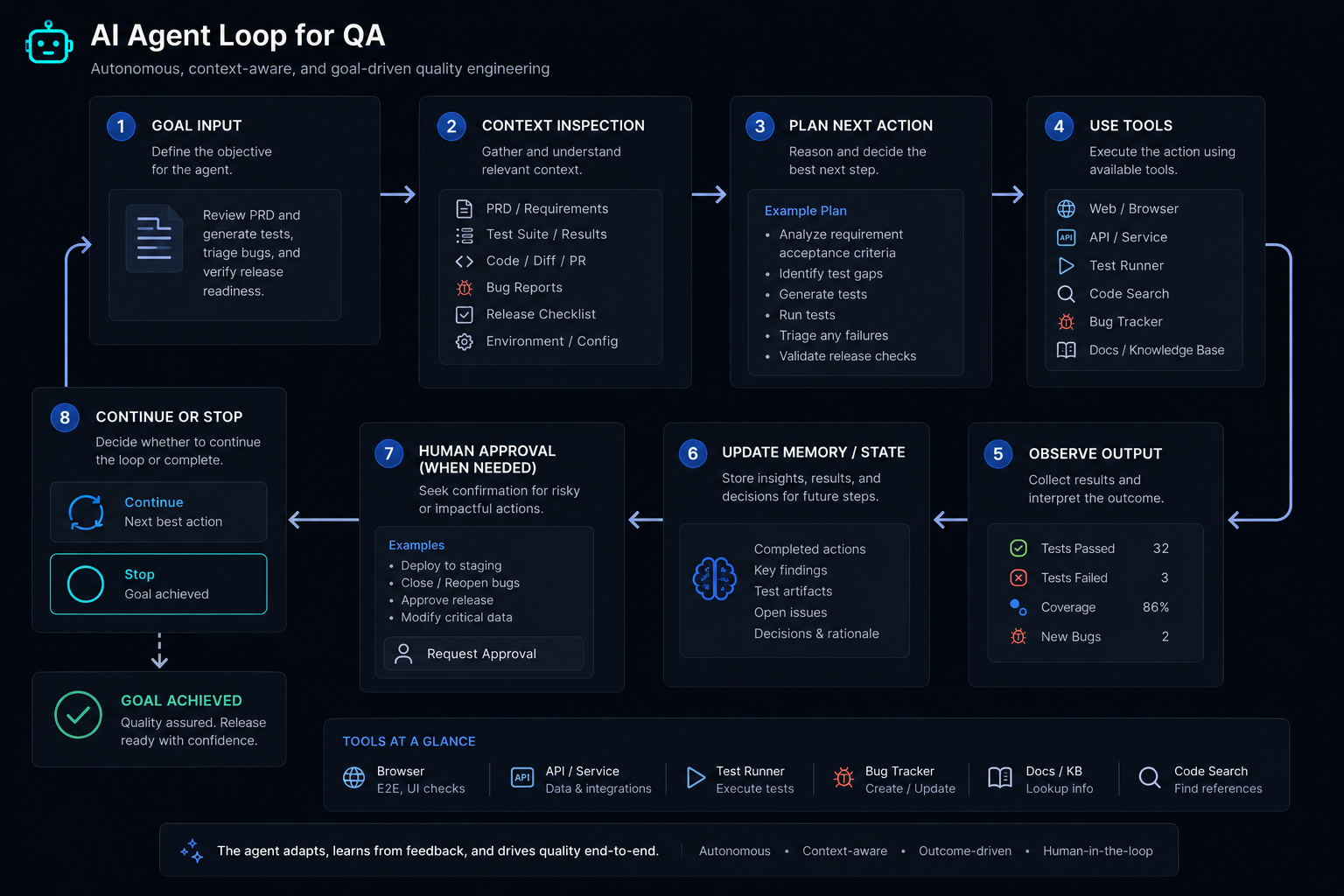
This loop does not mean the model is "thinking like a human." It means the system is designed to re-enter the model multiple times, often with new evidence, until the workflow reaches a valid completion point.
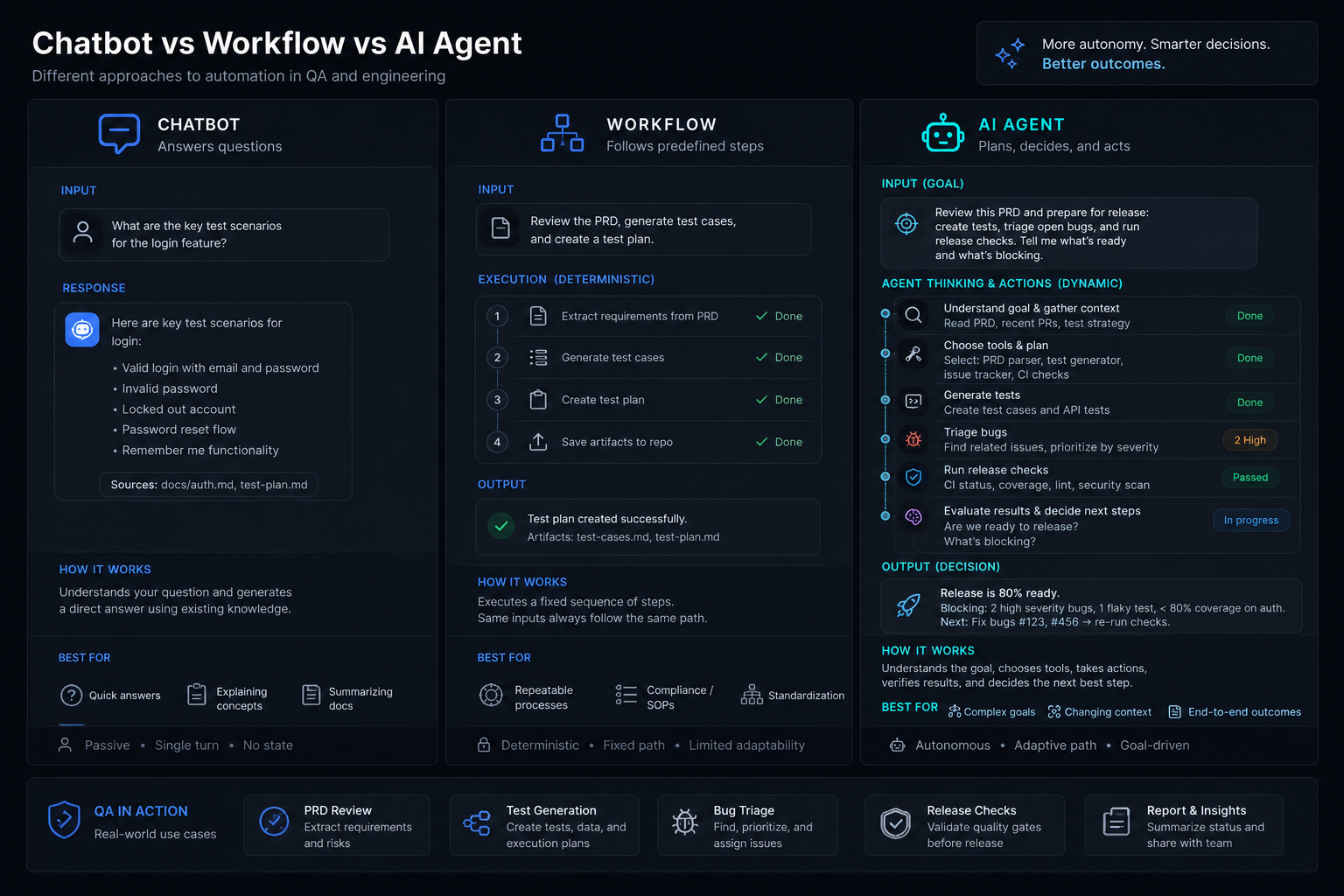
Agents vs Chatbots vs Workflows
This distinction is one of the most important ideas in the lesson.
| Pattern | Best For | Limitation |
|---|---|---|
| Chatbot | one-turn or conversational help | weak at structured multi-step execution |
| Fixed workflow | repetitive predictable tasks | poor when the system needs flexible decision-making |
| AI agent | multi-step adaptive tasks with tool use | more complex, more expensive, and riskier to operate |
Chatbot
A chatbot is useful when the job is mostly:
- answer a question
- explain a concept
- summarize a paragraph
- rephrase content
Example:
Explain this defect in simpler language for a product manager.
That is useful, but it is not truly agentic.
Workflow
A workflow is better when the sequence is already known:
- load PRD
- extract acceptance criteria
- generate scenarios
- export to a table
This can still be very valuable. In many teams, a workflow is the right answer and an agent would be unnecessary overhead.
Agent
An agent becomes useful when the system must decide between actions such as:
- whether to read a requirement or ask for missing context first
- whether to inspect logs, open a browser, or search a knowledge base
- whether enough evidence exists to continue
- whether it should stop and request human approval
This is much closer to real QA coordination work.
10 QA-Friendly Examples
Example 1: Requirement Clarification Agent
Goal:
- read a PRD
- identify ambiguities
- draft clarifying questions
Why it may be agentic:
- it may decide whether the requirement is complete enough
- it may retrieve related historical tickets
- it may stop if too much product context is missing
Example 2: Test Case Drafting Assistant
A simple chatbot can generate test cases from a prompt.
An agent can go further:
- read the requirement
- extract business rules
- look up similar features
- generate scenarios
- classify smoke vs regression
- ask for QA approval
Example 3: Defect Triage Agent
Inputs:
- bug report
- logs
- screenshot
- recent code changes
Possible agent actions:
- summarize issue
- identify likely component
- compare against similar incidents
- suggest severity candidates
- stop for human triage approval
Example 4: Flaky Test Investigator
This is a strong QA/SDET use case because the system may:
- inspect CI logs
- inspect traces
- compare historical failures
- classify likely flake vs regression
- recommend next investigation step
Example 5: Release Readiness Coordinator
An agent could gather:
- open high-severity bugs
- test execution results
- failed pipelines
- risk notes
Then it can produce a release summary and stop before the actual ship/no-ship decision.
Example 6: API Coverage Review Agent
The agent reads:
- API schema
- recent endpoint changes
- current test matrix
Then it identifies:
- missing auth cases
- negative cases
- field-validation gaps
- regression risks
Example 7: Documentation-to-Test Workflow Agent
The agent can:
- read onboarding docs
- extract flows
- produce test charters
- suggest automation candidates
- ask whether the result should be exported to manual or automation backlog
Example 8: Environment Health Checker
Before a test run, an agent may inspect:
- service status
- database connectivity
- seed-data readiness
- feature flags
This is useful because the system can stop early when the environment is clearly invalid.
Example 9: Accessibility Review Assistant
An agent may:
- inspect UI screenshots
- check labels and role patterns
- compare findings against accessibility guidance
- draft a QA review summary
Example 10: Regression Planning Assistant
An agent may:
- inspect changed files
- map impacted features
- suggest regression focus areas
- identify which suites should run first
This can save a QA lead real planning time, especially in large releases.
When QA Teams Should Use Agents
Agents are most useful when the task has most of these properties:
- multiple steps
- changing context
- tool access needs
- meaningful decision points
- a clear stopping condition
Good candidate tasks:
- requirement review with follow-up analysis
- defect triage with evidence gathering
- release-readiness coordination
- long-running investigation loops
- cross-system test support workflows
Bad candidate tasks:
- simple rewriting
- one-shot summarization
- fixed text formatting
- a deterministic export script
Those are usually better as:
- a plain prompt
- a script
- a workflow
not an agent.
Common Misconceptions
Misconception 1: Every Smart Prompt Is an Agent
False.
A long prompt with a good answer is still often just a prompt-response interaction.
Misconception 2: Agents Must Be Fully Autonomous
False.
Many of the most practical QA agents are approval-gated and human-supervised.
Misconception 3: More Autonomy Is Always Better
False.
In QA, too much unchecked autonomy can create:
- wrong severity suggestions
- invented requirements
- unsafe execution decisions
- misleading release confidence
Misconception 4: Agents Replace QA Judgment
False.
Agents can reduce manual coordination overhead, but they do not replace:
- risk thinking
- business understanding
- product skepticism
- release accountability
A QA Mental Model for the Rest of Level 8
For the rest of this level, think of an agent as a combination of:
- a model
- instructions
- tools
- memory or state
- stopping rules
- human approval boundaries
That is the foundation for everything else we will study next:
- tool calling
- planning
- MCP connectivity
- long-running stateful execution
- multi-agent coordination
- agent evaluation and observability
Practical Work
Exercise 1: Classify the Pattern
For each idea below, decide whether it is best implemented as:
- chatbot
- workflow
- single agent
- multi-agent system
Ideas:
- summarize a failed bug report
- convert one PRD into a test case table
- investigate a flaky test using logs and traces
- prepare a release-readiness summary from multiple systems
- review a large API change and decide which follow-up checks to run
For each one, explain:
- why a simpler option may be enough
- what makes the task agentic if you selected an agent
Exercise 2: Define an Agent Boundary
Choose one QA scenario such as:
- requirement analysis
- test generation
- defect triage
- environment validation
Write down:
- the agent goal
- the allowed tools
- the stopping condition
- the human approval step
This is the first habit of good agent design: define boundaries before implementation.
Exercise 3: Reject Over-Engineering
Take one task you currently do with AI.
Ask:
- does this actually need multiple steps?
- does it need tool access?
- does it need memory or state?
- does it need to choose among actions?
If the answer is mostly no, then do not call it an agent problem.
Reference Links
- OpenAI Agents SDK Guide
- OpenAI Tools Guide
- OpenAI Function Calling Guide
- OpenAI Agents SDK Quickstart
- Anthropic: Building Effective AI Agents
- Anthropic: Introducing Model Context Protocol
- Model Context Protocol Intro Docs
- LangGraph GitHub
- Microsoft Semantic Kernel GitHub
- Google Developers Blog: Production-Ready AI Agents
YouTube Resources
- How We Build Effective Agents: Barry Zhang, Anthropic
- OpenAI Agents SDK Tutorial (Full Series)
- Building AI Agent Workflows with Semantic Kernel
Key Takeaways
- An AI agent is a goal-directed system that can choose actions across multiple steps, often with tools, state, and stopping conditions.
- Agents are not the same as chatbots or fixed workflows, even though those patterns may still be useful.
- QA teams should use agents only when a task genuinely requires adaptive multi-step coordination.
- The safest QA agent designs keep human approval, evidence review, and operational boundaries in place.
- This lesson is the conceptual foundation for the rest of Level 8, where we will unpack tools, memory, MCP, orchestration, and evaluation in more detail.
Next Step
The next lesson, Tool Calling, Memory, and Planning, will break the agent idea into its core components so you can see exactly how these systems work under the hood.