Prompts for Test Case Generation
Generate high-coverage test cases with prompt templates for positive, negative, boundary, abuse, and risk-based scenarios.
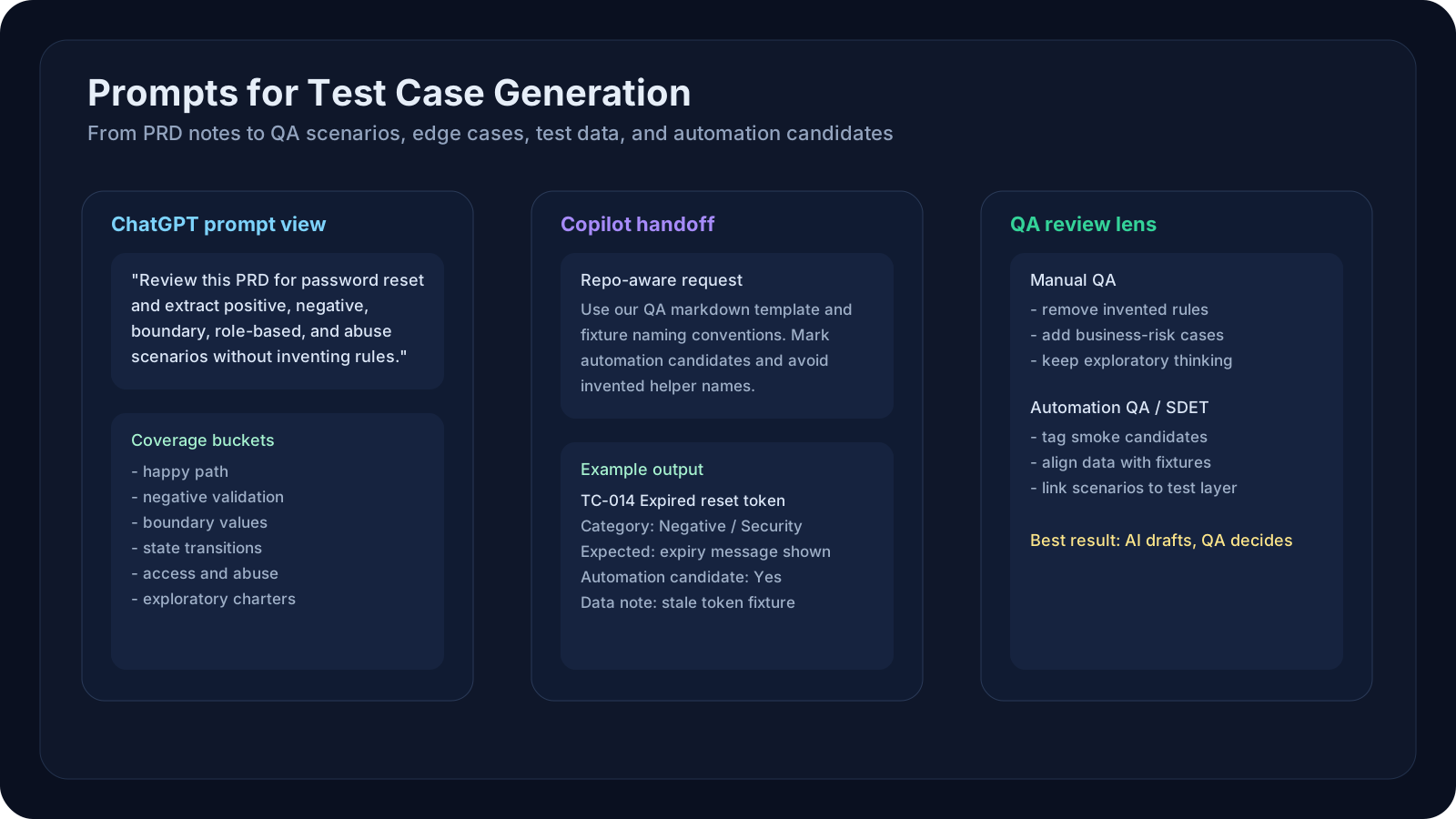
Overview
Test case generation is one of the fastest ways for QA teams to get value from AI tools. It is also one of the easiest places to create false confidence.
If you paste a PRD into ChatGPT and ask for "all test cases," you usually get a long list that looks useful but misses important risks:
- weak boundary coverage
- repeated cases with different wording
- missing negative scenarios
- invented business rules
- shallow expected results
This lesson teaches how to use ChatGPT and Microsoft Copilot tools productively for test design without outsourcing QA judgment.
A Practical Note for QA Learners
If this lesson feels dense, focus on these three ideas first:
- give the model enough business context
- force coverage categories instead of asking for generic test cases
- review every AI-generated case like a QA lead, not like a copy-paste assistant
That mental model alone will already improve your results.
Learning Goals
- Generate categorized test cases reliably from PRDs, user stories, and acceptance criteria.
- Use ChatGPT and Copilot differently based on the job to be done.
- Find edge cases hidden in business rules, field validation, and state transitions.
- Produce outputs that are reviewable by manual QA and reusable by automation teams.
- Generate supporting artifacts such as test data, traceability maps, and risk checklists.
Core Concepts
1. Use the Right Tool for the Right Stage
ChatGPT is usually better for:
- long-form requirement digestion
- exploratory what-if questioning
- test strategy brainstorming
- converting large PRDs into categorized scenario sets
Microsoft Copilot or GitHub Copilot Chat is usually better for:
- working inside the repo or IDE context
- generating structured test artifacts beside code
- converting accepted scenarios into automation scaffolds
- mapping requirements to existing APIs, fixtures, or helper libraries
Use them together instead of treating them as interchangeable.
2. AI Generates Faster When QA Thinks First
Before you prompt, define:
- feature goal
- user roles
- business rules
- validation rules
- state transitions
- data dependencies
- failure impact
The model becomes much stronger when the QA engineer has already framed the testing surface.
3. Force Coverage Buckets
Never ask only for "test cases." Ask for:
- happy path
- negative path
- boundary values
- validation errors
- state transition scenarios
- role-based access
- abuse or misuse cases
- data integrity checks
- integration failure paths
- regression risks
4. Demand a Useful Output Contract
Good output fields include:
- test ID
- scenario title
- category
- preconditions
- test steps
- expected result
- priority
- automation candidate yes/no
- notes on risks or assumptions
5. Prompt for Questions Before Test Cases
One of the strongest patterns is to ask the model to identify ambiguity first.
Example instruction:
1Before generating test cases, list missing business rules, undefined validations,2and workflow assumptions that could affect coverage. Do not invent answers.That single step often reveals gaps that human reviewers missed in the original PRD.
Tool Strategy: ChatGPT vs Copilot
| Task | ChatGPT | Copilot / GitHub Copilot Chat | Why |
|---|---|---|---|
| Summarize a long PRD | Strong | Medium | ChatGPT handles longer structured analysis well |
| Find missing edge cases | Strong | Medium | Better for broad reasoning and alternative paths |
| Create markdown test case tables | Strong | Strong | Both can do it if structure is explicit |
| Create repo-aligned test stubs | Medium | Strong | Copilot sees local code and helper patterns |
| Convert scenarios into Playwright skeletons | Medium | Strong | Better inside IDE context |
| Draft exploratory charters | Strong | Medium | ChatGPT works better for free-form thinking |
A Strong Prompt Pattern for PRD-Based Test Design
Use a two-step workflow.
Step 1: Analyze the Requirement
1You are a senior QA engineer reviewing a product requirement document.23Task:41. Summarize the feature in plain language.52. Extract user roles, validations, workflows, dependencies, and failure risks.63. List ambiguities or missing rules that could lead to coverage gaps.74. Do not invent product behavior that is not in the source text.89Return sections:10- Feature summary11- Key business rules12- Missing information13- Initial risk areasStep 2: Generate Structured Test Cases
1You are designing test cases for a QA team.23Generate a structured set of test cases from the analyzed requirement.45Coverage categories required:6- happy path7- negative8- boundary9- permission/access10- state transition11- integration12- regression-sensitive1314Rules:15- avoid duplicates16- do not invent unsupported rules17- write clear expected results18- tag cases that are good automation candidates1920Return as a markdown table with columns:21ID | Scenario | Category | Preconditions | Steps | Expected Result | Priority | Automation CandidateFinding Edge Cases from PRD Documents
When you want edge cases specifically, ask narrower questions.
Example Prompt for Edge Case Mining
1Review this PRD for a checkout discount feature.23Find edge cases in:4- field validation5- currency handling6- rounding7- coupon expiration8- duplicate coupon application9- guest vs logged-in user behavior10- retry and refresh behavior11- partial failures from downstream pricing services1213Return only edge cases and explain why each one matters.This tends to surface higher-value scenarios than a generic test-case prompt.
Test Data Generation with AI
AI is also useful for generating test data ideas, not only scenarios.
Use Cases
- valid and invalid names
- international phone numbers
- addresses with tricky formatting
- date combinations
- malformed emails
- boundary numeric values
- realistic API payload combinations
- masked but realistic financial-style records
Example Prompt for Test Data
1Generate test data for a user-registration form.23Fields:4- first_name5- last_name6- email7- phone8- date_of_birth9- postal_code1011Need:12- 10 valid combinations13- 10 invalid combinations14- 10 boundary or tricky combinations1516For each record, explain what validation or risk it targets.Practical Examples
Below are examples that manual QA and automation QA engineers can use immediately.
Example 1: ChatGPT for PRD to Scenario Draft
Input:
- a new password-reset PRD
Goal:
- generate initial coverage buckets
Good use:
- broad scenario discovery
Example 2: ChatGPT for Ambiguity Detection
Ask:
1Identify the business rules that are implied but not explicitly defined in this PRD.2List questions a QA engineer should ask before test execution starts.Example 3: ChatGPT for Boundary Analysis
Use it for:
- min/max field lengths
- numeric ranges
- date windows
- rate-limit thresholds
Example 4: ChatGPT for Risk-Based Prioritization
Ask for:
- P0 / P1 / P2 prioritization
- business impact
- likely user-visible failures
Example 5: ChatGPT for Exploratory Charters
Prompt:
1Convert these acceptance criteria into 5 exploratory testing charters.2Each charter should focus on one risk theme and include a short mission statement.Example 6: ChatGPT for Role-Based Coverage
Useful for:
- admin vs normal user
- guest vs authenticated
- partner vs internal support user
Example 7: ChatGPT for Localization or Internationalization Cases
Ask for:
- currency formatting
- timezone effects
- translated labels
- right-to-left layout side effects if relevant
Example 8: ChatGPT for Data-Matrix Expansion
Use it to expand one rule into many combinations:
- country x payment type
- subscription tier x permission
- browser x feature flag
Example 9: ChatGPT for Requirement-to-Test Traceability
Prompt:
1Map each acceptance criterion to at least one positive and one negative test case.2Flag any criterion that does not yet have enough information for reliable testing.Example 10: ChatGPT for Regression Risk Reminders
Ask:
- what nearby features are likely to regress?
- which older workflows need smoke coverage?
Example 11: Copilot Chat for Repo-Aware Test Template Creation
Use when:
- your project already has a test case format
- your repo already stores cases as JSON, markdown, or YAML
Prompt inside IDE:
1Using the existing QA markdown template in this repository,2create a new test case document for the password reset PRD.3Follow the same headings and naming conventions.Example 12: Copilot Chat for Existing Test Coverage Gap Review
Ask Copilot:
1Compare the PRD summary below with our existing Playwright specs in this repo.2List which acceptance criteria appear uncovered.3Do not assume coverage unless you can point to a relevant test file.Example 13: Copilot Chat for Automation Candidate Tagging
Use it to label:
- smoke candidates
- regression candidates
- complex manual-only cases
Example 14: Copilot Chat for Fixture-Aligned Test Data
Prompt:
1Look at our existing test fixtures and propose new realistic records2for boundary and negative cases related to checkout address validation.Example 15: Copilot Chat for API-to-Scenario Mapping
If the feature spans UI and backend:
- ask Copilot to link relevant endpoints
- then derive missing scenario coverage
Example 16: Manual QA Workflow Example
Scenario:
- new referral-code feature
Use ChatGPT to:
- summarize rules
- find edge cases
- draft first-pass cases
Then the manual QA engineer:
- removes invented assumptions
- adds business-risk cases
- adds exploratory charters
Example 17: Automation QA Workflow Example
Scenario:
- subscription upgrade flow
Use ChatGPT to:
- create scenario matrix
Use Copilot to:
- map the final automation candidates into existing Playwright test structure
Example 18: Test Data Pack Generation
Use ChatGPT for:
- diverse user profiles
- invalid payment card combinations
- malformed address cases
Use Copilot for:
- converting the final set into local fixture files
Example 19: Negative Scenario Mining
Prompt:
1Generate only negative scenarios for this feature.2Exclude positive flows completely.3Focus on validation, stale state, retry behavior, and unauthorized access.Example 20: Executive Test Review Summary
Once cases are generated, ask:
1Summarize the current test design in one page for a QA lead.2Show major risk areas, missing information, and top automation candidates.Example Output Shapes
Example ChatGPT Output Style
Good ChatGPT output for test design usually looks like:
- grouped categories
- concise scenario titles
- assumptions called out
- risks explained in plain language
Example Copilot Output Style
Good Copilot output usually looks like:
- repo-aligned file names
- test case structure that matches current team conventions
- references to existing helper utilities
- easier handoff into implementation
Manual QA Perspective
Use these prompts to improve:
- test planning
- exploratory coverage
- review conversations with product owners
- risk communication before release
Manual QA still adds the most value in:
- judging business impact
- identifying confusing UX flows
- spotting unrealistic assumptions
- testing ambiguous or evolving product behavior
Automation QA / SDET Perspective
Use these prompts to improve:
- automation candidate selection
- traceability from requirement to automated test
- fixture and data design
- test-case-to-spec conversion
- regression pack design
Do not let AI skip:
- selector strategy
- cleanup logic
- test isolation concerns
- environment assumptions
- determinism checks
Hands-On Lab
Lab: PRD to Reviewable QA Pack
Take one real feature document from your team and produce:
- requirement summary
- ambiguity list
- risk list
- 25 structured test cases
- 10 edge cases
- 10 test-data records
- automation candidate shortlist
Do it in this order:
- Use ChatGPT for requirement digestion and broad case ideation.
- Review and trim the output manually.
- Use Copilot in your IDE to adapt the final scenarios to your repo format.
- Mark which cases belong in smoke, regression, or exploratory buckets.
Reflection Questions
- Which part of the workflow needed the most human correction?
- Which prompt change produced the biggest improvement in quality?
- Which cases looked convincing but were actually low value?
- Which outputs were directly reusable by automation engineers?
Recommended Resources
- GitHub Copilot documentation
- Microsoft Copilot documentation
- OpenAI prompt engineering guide
- OpenAI Cookbook
- Ministry of Testing
- Test Automation University
Key Takeaways
- AI-generated test cases are strongest when the QA engineer forces coverage buckets and output structure.
- ChatGPT is usually better for broad requirement analysis and scenario expansion.
- Copilot is usually better for repo-aware adaptation and automation handoff.
- PRD-based prompting should include ambiguity detection before test generation.
- Test data generation is part of good test design, not an afterthought.
- Human QA review is what turns AI output into production-ready coverage.
Next Step
Continue to Prompts for API and Backend Testing to apply the same discipline to contracts, payloads, state transitions, and backend risk analysis.