Prompts for UI Automation
Create prompts that generate stable UI automation scaffolds, selectors strategy, resilient assertions, and flake-aware test structure.
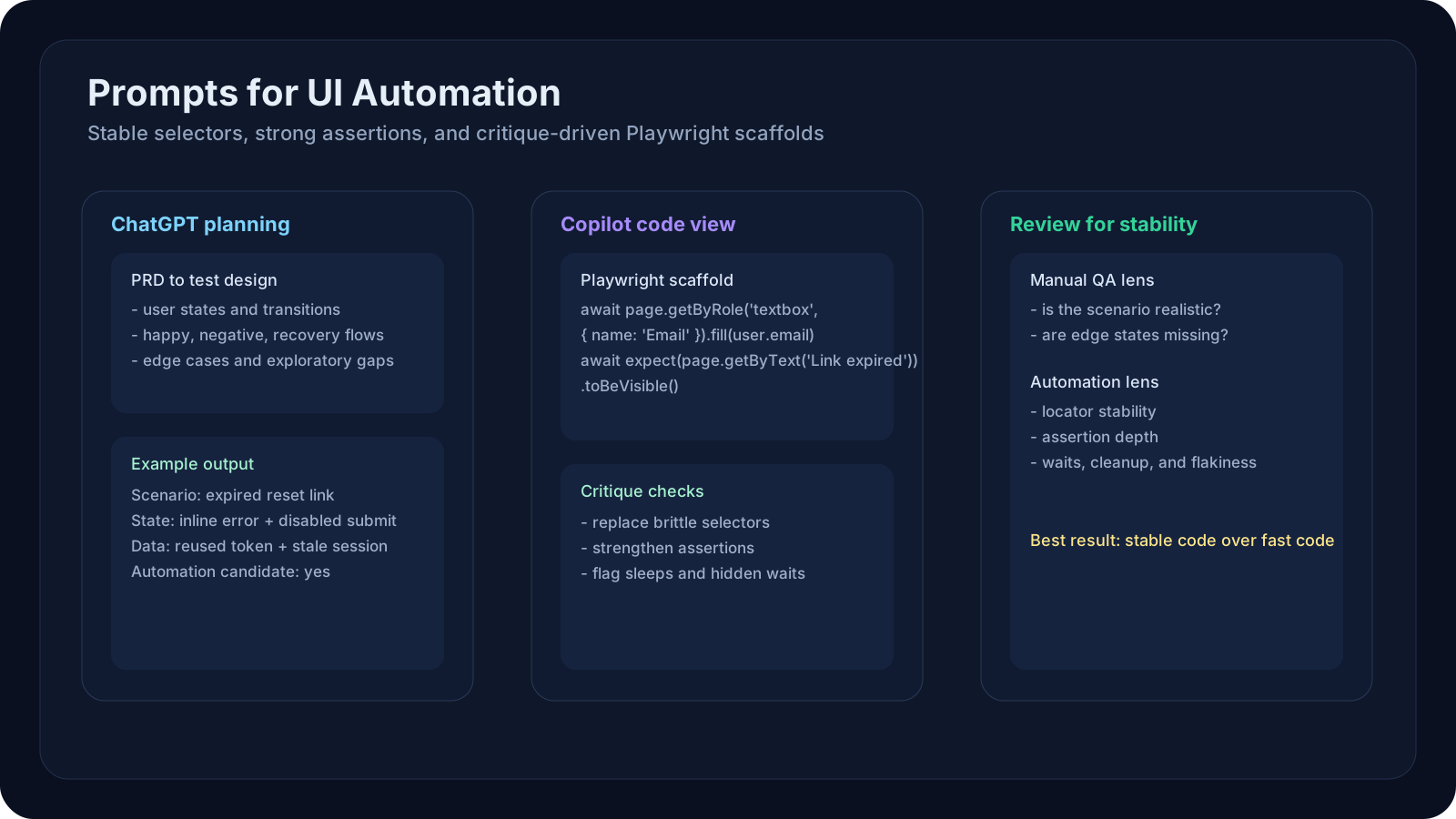
Overview
UI automation is where AI output can look the most impressive and fail the fastest. A generated test may look clean, but if it uses brittle selectors, weak assertions, or unrealistic waits, it becomes technical debt almost immediately.
This lesson focuses on how to use ChatGPT and Copilot to produce UI automation outputs that are more stable, reviewable, and aligned with real QA engineering practice.
A Practical Note for QA Learners
If you only keep one rule from this lesson, keep this one:
Do not ask AI to "write a Playwright test" and trust the first answer. Ask it to reason about selectors, assertions, state transitions, and flakiness controls first.
Learning Goals
- Use AI tools to generate better UI automation scaffolds instead of brittle one-shot scripts.
- Apply different prompt strategies for ChatGPT and Copilot.
- Generate stronger selectors, assertions, and test data for UI flows.
- Use AI to translate PRDs into automation candidates and exploratory gaps.
- Build critique prompts that catch flaky generated code early.
Core Concepts
1. Stable Selector Strategy Must Be Explicit
Good prompts should prefer:
- role-based selectors
- accessible names
- labels
- stable
data-testidstyle attributes - domain-specific component hooks if the team already uses them
Bad prompts allow:
nth-child- brittle CSS chains
- text that changes often
- layout-based selectors
2. Assertion Quality Matters as Much as Selector Quality
Ask for:
- visible UI outcome
- state validation
- negative assertions where relevant
- persisted effect checks if the UI triggers backend change
- accessibility or user-facing feedback where appropriate
3. Split the Workflow
Use ChatGPT for:
- flow decomposition
- test design from PRDs
- edge-case finding
- ambiguity and risk discovery
Use Copilot for:
- Page Object adaptation
- generating repo-aligned specs
- using existing fixture and helper patterns
- reviewing locator choices against actual code
4. Critique the Generated Code
Always run a second-pass critique prompt asking the model to inspect:
- selector brittleness
- weak assertions
- overuse of sleeps
- missing cleanup
- hidden assumptions about environment state
ChatGPT vs Copilot for UI Work
| Task | ChatGPT | Copilot / GitHub Copilot Chat | Why |
|---|---|---|---|
| Convert PRD to UI test scenarios | Strong | Medium | Better for broad reasoning |
| Find edge cases in user workflow | Strong | Medium | Better for exploratory thinking |
| Create first-pass Playwright pseudocode | Strong | Strong | Both are useful |
| Adapt to your existing Page Object Model | Medium | Strong | Copilot sees local code |
| Improve selectors in an existing spec | Medium | Strong | IDE context matters |
| Generate critique on flaky code | Strong | Strong | Both can help if you give the code |
Prompt Pattern: From PRD to Stable UI Test
Step 1: Scenario and Risk Design
1You are a senior QA automation engineer.23Read this PRD and extract:4- user roles5- workflow steps6- validations7- UI states8- error states9- risky transitions10- ambiguity that affects automation design1112Return:13- feature summary14- key UI states15- automation candidates16- exploratory-only risksStep 2: Automation Scaffold with Constraints
1Generate a Playwright test scaffold for the approved scenarios.23Constraints:4- prefer role, label, and data-testid selectors5- avoid nth-child and fragile CSS chains6- include meaningful assertions7- do not use arbitrary sleep8- mark assumptions where the DOM structure is unknown9- include setup and cleanup notes if requiredPractical Examples
Example 1: ChatGPT for Login PRD to Test Scenario Set
Use ChatGPT to convert:
- login requirements
- MFA rules
- lockout rules
- password validation
into:
- positive cases
- negative cases
- security-related UX cases
- usability edge cases
Example 2: ChatGPT for Edge Cases from PRD
Prompt:
1Review this password-reset PRD and list UI edge cases related to:2- expired links3- multiple tabs4- browser refresh5- stale session state6- password mismatch7- accessibility feedbackExample 3: ChatGPT for Exploratory Charters
Prompt:
1Create 5 exploratory testing charters for this onboarding flow.2Each charter should target one failure theme such as validation, navigation, or recovery from error.Example 4: ChatGPT for Test Data Planning
Ask for:
- valid names
- overly long names
- unicode characters
- disposable email patterns
- invalid postal codes
- locale-sensitive address combinations
Example 5: ChatGPT for State Model Thinking
Prompt:
1List the important UI states in this checkout flow and explain what should be asserted in each state.Example 6: Copilot for Repo-Aligned Playwright Spec
In the IDE:
1Create a Playwright spec for the approved checkout scenarios.2Follow our existing Page Object pattern and fixture setup.3Reuse helpers already in this repository.Example 7: Copilot for Page Object Additions
Prompt:
1Add methods to the CheckoutPage object for coupon entry, shipping selection, and order confirmation.2Follow the same style as the existing page objects.Example 8: Copilot for Selector Improvement
Prompt:
1Review this Playwright test and replace brittle selectors with role-, label-, or testid-based alternatives where possible.2Explain any selectors that still look fragile.Example 9: Copilot for Assertion Improvement
Prompt:
1Strengthen the assertions in this generated UI test.2Check for visible confirmation, disabled state changes, error messages, and navigation outcome.Example 10: Copilot for Fixture-Aware Test Data
Prompt:
1Look at our current test fixtures and generate additional user profiles for checkout testing:2- first-time buyer3- returning buyer4- invalid address user5- promo-code edge case userExample 11: Manual QA Workflow Example
Feature:
- profile edit form
Use ChatGPT to:
- identify validations
- find recovery/error cases
- suggest exploratory charters
Manual QA then:
- verifies UX expectations
- adds confusing-human-behavior cases
- adjusts priority based on release risk
Example 12: Automation QA Workflow Example
Feature:
- cart checkout
Use ChatGPT to:
- produce scenario matrix and UI states
Use Copilot to:
- implement final approved automation structure in Playwright
- align it to existing helpers and fixtures
Example 13: PRD to Automation Candidate Filter
Prompt:
1Given these scenarios, tag which ones are:2- strong automation candidates3- weak automation candidates4- better suited to exploratory or manual testing5Explain why.Example 14: Accessibility Prompt
Use ChatGPT or Copilot to ask for:
- label presence
- keyboard flow
- validation feedback visibility
- focus management after errors
Example 15: Cross-Browser Risk Prompt
Ask:
1What UI behaviors in this feature are likely to behave differently across browsers or viewport sizes?Example 16: Flakiness Critique Prompt
1Review this Playwright test for flakiness risks.2Look for unstable selectors, timing assumptions, hidden dependencies, missing waits, and weak cleanup.3Return fixes in priority order.Example 17: Screenshot/Visual-State Planning
Use AI to help list:
- states worth snapshotting
- states worth validating textually
- states where visual-only assertions are unsafe
Example 18: PRD to Error-State Coverage
Prompt:
1Generate only UI error-state scenarios from this PRD.2Include server errors, validation errors, retries, empty states, and recovery paths.Example 19: Data-Driven UI Matrix
Ask for matrices across:
- user role
- feature flag state
- locale
- device size
- account status
Example 20: Release Summary for UI Automation
Prompt:
1Summarize which parts of this user flow are best covered by UI automation, which should be API-level, and which still need manual exploratory testing.Example Tool-Specific Prompts
ChatGPT Prompt: PRD to Test Design
1Act as a QA lead reviewing a new subscription-management feature.23From the PRD below:4- identify UI states5- generate positive, negative, and boundary scenarios6- highlight ambiguous rules7- suggest test data combinations8- tag which scenarios are good automation candidatesCopilot Prompt: Test Implementation in Repo Context
1Using the approved scenarios, create a Playwright spec and update page objects if needed.2Follow our current naming, fixture, and assertion patterns.3Do not add helpers that duplicate existing utilities.Manual QA Perspective
Manual QA can use AI here for:
- stronger exploratory preparation
- better edge-case brainstorming
- turning PRD language into concrete UI checks
- faster risk communication
Manual QA must still own:
- judgment about confusing UX
- realism of user behavior
- accessibility nuance
- business priority
Automation QA / SDET Perspective
Automation teams can use AI for:
- scenario decomposition
- selector strategy review
- code scaffold generation
- page object updates
- flakiness critique
They still need to own:
- architecture
- test isolation
- retry policy
- environment management
- maintainability decisions
Hands-On Lab
Lab: PRD to Stable Playwright Candidate Pack
Pick one user flow such as sign-up, checkout, or profile update.
Produce:
- feature summary
- UI state map
- 20 scenarios
- 10 edge cases
- test data set
- automation candidate shortlist
- first-pass Playwright scaffold
- critique report on the generated code
Suggested order:
- Use ChatGPT for scenario design and edge-case discovery.
- Review the results manually.
- Use Copilot to generate repo-aware code.
- Run a critique prompt on the generated automation.
- Decide what belongs in UI automation vs API or manual testing.
Reflection Questions
- Which generated selectors were good enough to keep?
- Which assertions were too weak?
- Which scenarios looked automatable but were poor candidates in reality?
- What would you add to your team's standard UI automation prompt?
Recommended Resources
- GitHub Copilot documentation
- Microsoft Copilot documentation
- OpenAI prompt engineering guide
- Playwright best practices
- Cypress best practices
- Selenium documentation
Key Takeaways
- UI automation prompts must optimize for stability, not just speed.
- ChatGPT is strong for PRD analysis, edge cases, and flow decomposition.
- Copilot is strong for repo-aware code generation and selector improvement.
- Strong UI prompts explicitly constrain selectors, assertions, and timing assumptions.
- Test data and UI states should be part of the prompt, not added later.
- AI output becomes valuable only after QA engineering review.
Next Step
Continue to Prompts for Defect Analysis and Triage to see how prompts can support bug investigation, evidence summaries, duplicate detection, and release decisions.